oemdba – blogs about OEM and more

Oracle Enterprise Manager – SYSMAN is my best friend 😉

Blog-Bild

Category: database

  • Oracle AI Database Administration Certified Professional – How I passed and how you can too

    Initially, I planned to certify as Oracle Database 19c OCP.
    19c is still the long-term release and is still used in many environments.
    And it’s been a really long time since I earned my 12c certification.

    However, while preparing my learning path, I asked myself a simple question:
    Wouldn’t it make more sense to get certified for the new 26ai, which is finally available on‑premises?

    So instead of certifying on an established platform, I decided to focus on what comes next and went for the Oracle AI Database Administration Certified Professional, based on Oracle Database 23ai / 26c.

    After about three to four weeks of preparation, I passed the exam yesterday.
    This post summarizes my preparation for the exam and highlights the topics that should be paid particular attention to.

    Preparation Strategy

    My preparation took approximately three to almost four weeks. The effort should not be underestimated; this is not an exam you pass without focused study.

    So, what was my preparation?

    I read the documentation “Oracle AI Database – New Features for Administrators”

    This documentation is a good reference point for understanding which features Oracle considers relevant for database administrators today.
    It contains topics like AI Vector Search, which was really new for me, Application Deployment (including JSON), and much more.

    Furthermore, I watched the following course on mylearn.oracle.com:

    Oracle AI Database – New Features for Administrators

    This course covers additional interesting topics such as True Cache, several chapters on performance tuning and Oracle advisors, migration topics, and more.

    So, if you have the possibility to watch this course – do it 😉

    The course also includes a Student Guide and an Activity Guide, and you can request your own lab so that you can practice hands‑on.

    If you cannot watch the mentioned course, you might want to try the Oracle LiveLabs:
    https://livelabs.oracle.com/ords/r/dbpm/livelabs/view-workshop?wid=3950

    There is the possibility to perform all exercises in your own environment.
    I did not use this specific lab, but all LiveLabs I have used so far were of good quality.

    So, try, try, try.
    Especially topics like multitenant management, RMAN recovery, or PDB relocation only really “stick” when you perform them yourself.

    Exam focus areas – what really matters

    I obviously cannot share actual exam questions, but I can share my observations regarding topic focus.

    Performance Tuning

    • AWR
    • ADDM
    • Advisors
    • Performance analysis in CDB vs. PDB context

    Understanding where and how to analyze performance is essential.

    Multitenant – The core topic

    No surprise here: Multitenant is no longer optional.

    Important areas include:

    • PDB relocate
    • Transportable PDBs
    • Clear understanding of CDB and PDB separation

    RMAN Backups in Multitenant Architectures

    Expect questions about:

    • CDB‑level backups
    • PDB‑level restore and recovery
    • Conceptual understanding, not just RMAN commands

    Application Containers

    • They do appear
    • For me: one to three questions

    You should know the idea and the basic administration concepts.

    Security Topics

    • Some security‑related questions
    • In my case: no SQL Firewall
    • Focus was on general security concepts and architecture

    Installation and upgrades

    • AutoUpgrade
    • DBCA
    • Grid Infrastructure

    Who should consider this certification?

    In my opinion, this certification is well suited for DBAs who:

    • already hold an Oracle OCP (e.g. 12c or 19c)
    • work regularly with multitenant environments
    • want to stay aligned with Oracle’s future database direction

    Conclusion

    This certification requires time and focus. It should be planned and supported accordingly.

    For database administrators, it provides:

    • a consolidated understanding of Oracle Database architecture
    • updated knowledge
    • formal validation of expertise

    For employers, certified administrators represent:

    • reduced operational risk
    • verified skill levels
    • stronger positioning for future Oracle Database projects

    From this perspective, Oracle certification is a clear win‑win situation.

  • PRCD‑1024 and PRCR‑1055 After Creating a Standby Database with Oracle Restart

    In preparation for my presentation at the DOAG Database with Cloud Infrastructure (#DOAGDB26) conference, I built a small Data Guard test environment and created the standby database using Oracle Enterprise Manager (OEM).

    After creating a physical standby database via Oracle Enterprise Manager and registering it with Oracle Restart, srvctl commands failed with:

    PRCD-1024 : Failed to retrieve instance list for database DEMODB_BARDG02
    PRCR-1055 : Cluster membership check failed for node bardg02

    The setup of my environment was done as follows:

    1. Created a virtual machine named bardg01
    2. Installed Oracle Enterprise Linux 9.4
    3. Copied the gold images for:
      Oracle Grid Infrastructure 19.28
      Oracle Database 19.28
    4. Unzipped both into their respective directories
    5. Installed the required oracle-database-preinstall-* packages
    6. Configured the grid user

    After that, I cloned the VM, adjusted the network configuration, and two identical systems were available:

    • bardg01
    • bardg02

    Grid Infrastructure and Database Installation

    bardg01

    On bardg01, I installed Oracle Grid Infrastructure for Standalone Server (Oracle Restart) without ASM.

    I performed a software‑only installation and configured Oracle Restart afterwards.
    The installation completed without issues.

    After that, I installed the RDBMS software and created a database using DBCA.
    Everything worked as expected.

    bardg02

    On bardg02, I repeated the same Grid Infrastructure and RDBMS installation steps.
    At this stage, I did not create a database.

    Creating the Standby Database with OEM

    After installing the OEM agents on both hosts, I created a physical standby database via OEM.

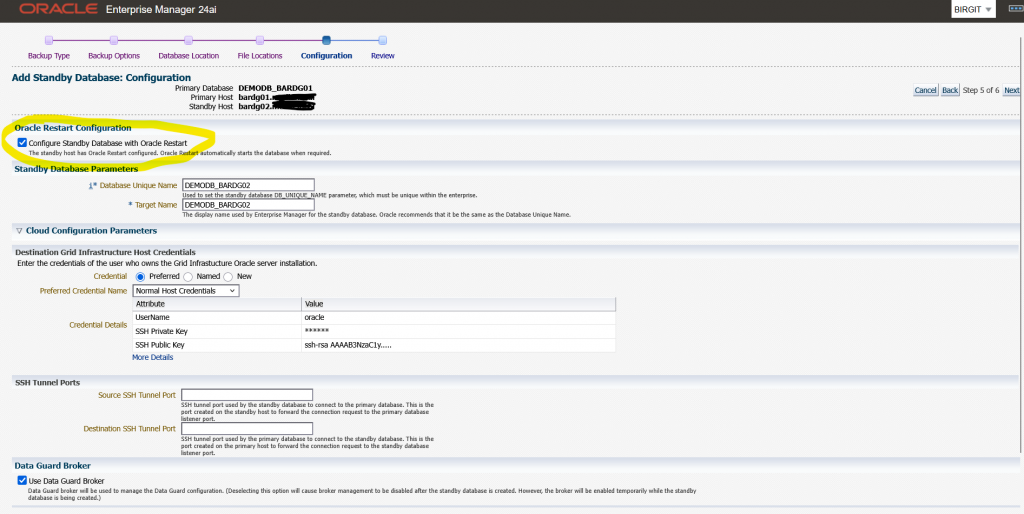
    During the wizard I selected the option to “Configure Standby Database with Oracle Restart”
    See the image below:

    The OEM job finished successfully.
    However, after reviewing the environment, I noticed that:

    • The standby database was registered with Oracle Restart
    • The database itself was running, but was shown as offline
    grid@bardg02 ~> crsctl stat res -t
    --------------------------------------------------------------------------------
    Name           Target  State        Server                   State details
    --------------------------------------------------------------------------------
    Local Resources
    --------------------------------------------------------------------------------
    ora.LISTENER.lsnr
                   ONLINE  ONLINE       bardg02                  STABLE
    ora.ons
                   OFFLINE OFFLINE      bardg02                  STABLE
    --------------------------------------------------------------------------------
    Cluster Resources
    --------------------------------------------------------------------------------
    ora.cssd
          1        OFFLINE OFFLINE                               STABLE
    ora.demodb_bardg02.db
          1        OFFLINE OFFLINE                               STABLE
    ora.diskmon
          1        OFFLINE OFFLINE                               STABLE
    ora.evmd
          1        ONLINE  ONLINE       bardg02                  STABLE
    --------------------------------------------------------------------------------

    At this point, I simply wanted to check the status of the standby database.

    oracle@bardg02 ~> . oraenv
    ORACLE_SID = [DEMODB] ? DEMODB
    The Oracle base remains unchanged with value /u01/app/oracle
    oracle@bardg02 ~> srvctl status database -db demodb_bardg02
    PRCD-1024 : Failed to retrieve instance list for database DEMODB_BARDG02
    PRCR-1055 : Cluster membership check failed for node bardg02

    In my environment, every srvctl command on this host resulted in the same error combination.
    On my primary host bardg01 every srvctl command was successful.

    At this point, I verified a few things:

    • The Grid Infrastructure installation had completed without errors
    • I had not manually changed the CSSD configuration
    • On both hosts, cssd was OFFLINE

    I searched online and in MOS and came to the conclusion that this error pair is typically triggered by cluster membership checks performed by srvctl, even in Oracle Restart setups without ASM.

    Starting CSSD

    My next test was to start CSSD, and I configured it to start automatically after reboot.

    grid@bardg02 ~> crsctl modify resource ora.cssd -attr "AUTO_START=always" -unsupported
    grid@bardg02 ~> crsctl start res ora.cssd -unsupported
    grid@bardg02 ~> crsctl stop has
    CRS-2791: Starting shutdown of Oracle High Availability Services-managed resources on 'bardg02'
    CRS-2673: Attempting to stop 'ora.LISTENER.lsnr' on 'bardg02'
    CRS-2677: Stop of 'ora.LISTENER.lsnr' on 'bardg02' succeeded
    CRS-2673: Attempting to stop 'ora.evmd' on 'bardg02'
    CRS-2677: Stop of 'ora.evmd' on 'bardg02' succeeded
    CRS-2793: Shutdown of Oracle High Availability Services-managed resources on 'bardg02' has completed
    CRS-4133: Oracle High Availability Services has been stopped.
    
    grid@bardg02 ~> crsctl start has
    CRS-4123: Oracle High Availability Services has been started.
    
    grid@bardg02 ~> crsctl stat res -t
    --------------------------------------------------------------------------------
    Name           Target  State        Server                   State details
    --------------------------------------------------------------------------------
    Local Resources
    --------------------------------------------------------------------------------
    ora.LISTENER.lsnr
                   ONLINE  ONLINE       bardg02                  STABLE
    ora.ons
                   OFFLINE OFFLINE      bardg02                  STABLE
    --------------------------------------------------------------------------------
    Cluster Resources
    --------------------------------------------------------------------------------
    ora.cssd
          1        ONLINE  ONLINE       bardg02                  STABLE
    ora.demodb_bardg02.db
          1        ONLINE  INTERMEDIATE bardg02                  Mounted (Closed),HOM
                                                                 E=/u01/app/oracle/pr
                                                                 oduct/19.28/db_home1
                                                                 ,STABLE
    ora.diskmon
          1        OFFLINE OFFLINE                               STABLE
    ora.evmd
          1        ONLINE  ONLINE       bardg02                  STABLE
    --------------------------------------------------------------------------------

    After that I retried the srvctl command:

    oracle@bardg02 ~> srvctl status database -db DEMODB_BARDG02
    Database is running.

    Attribute HOSTING_MEMBERS

    To better understand the behaviour, I ran some additional tests with the database resource attribute HOSTING_MEMBERS.

    grid@bardg02 ~> crsctl modify resource "ora.demodb_bardg02.db" -attr "HOSTING_MEMBERS=" -unsupported
    grid@bardg02 ~> crsctl stat res ora.demodb_bardg02.db -f |grep HOSTING_
    HOSTING_MEMBERS=

    All srvctl commands ran successfully

    oracle@bardg02 ~> srvctl status database -db DEMODB_BARDG02
    Database is running.
    oracle@bardg02 ~> srvctl stop database -db DEMODB_BARDG02
    oracle@bardg02 ~> srvctl status database -db DEMODB_BARDG02
    Database is not running.
    oracle@bardg02 ~> srvctl start database -db DEMODB_BARDG02
    oracle@bardg02 ~> srvctl status database -db DEMODB_BARDG02
    Database is running.

    With this configuration the database could be managed even when cssd was OFFLINE.

    Next test:

    1. HOSTING_MEMBERS=bardg02
    2. cssd = OFFLINE

    All srvctl commands failed again with:

    PRCD-1024 : Failed to retrieve instance list for database demodb_bardg02
    PRCR-1055 : Cluster membership check failed for node bardg02

    Next test:

    1. HOSTING_MEMBERS=bardg02
    2. cssd = ONLINE

    All srvctl commands ran successfully

    Conclusion

    Based on my tests, I can conclude the following:

    • After installing Grid Infrastructure for a standalone server, cssd may initially be OFFLINE
    • Databases created with DBCA work without issues
    • Databases added later (for example via OEM Data Guard) can fail with PRCD‑1024 / PRCR‑1055 if cssd is not running
    • When HOSTING_MEMBERS is used, srvctl clearly relies on cssd, even in Oracle Restart setups without ASM.

    Recommendation

    From my perspective, there are two possible options:

    1. Start and enable CSSD
      • Ensure cssd starts automatically after reboot
      • This is the recommended and clean solution
    2. Remove HOSTING_MEMBERS from the database resource
      • This works technically
      • However, it relies on unsupported configuration changes

    My recommendation:
    After installing Oracle Grid Infrastructure for a standalone server, always verify that CSSD is online and configured to start automatically.

    Hope that helps!