oemdba – blogs about OEM and more

Oracle Enterprise Manager – SYSMAN is my best friend 😉

Blog-Bild

Month: May 2026

  • DOAG Database & Cloud Infrastructure Conference 2026 in Soltau – My Highlights

    From ACE dinner to technical sessions and great conversations — a look back at two fully packed days.

    On Monday and Tuesday, the DOAG Database & Cloud Infrastructure 2016 conference took place at Heide Park Soltau — and it didn’t disappoint.
    Two packed days full of very good presentations, interesting news, and, most importantly, great conversations. 😉

    In this blog, I would like to share my impressions and talk about the presentations I attended.

    Sunday – ACE Community and Networking

    On Sunday evening, I was invited to the Oracle ACE community dinner — great people, a fantastic dinner, and, as always, good conversations with other ACEs.
    Afterwards, the evening continued with a “come-together,” where participants and speakers gathered for a drink and extended their discussions around AI, databases, cloud, and many other topics.

    Oracle ACE dinner at DOAG database & cloud infrastructure 2026 at heide Park Soltau

    Monday – AI, High Availability, and My Presentation

    After this great start on Sunday evening, Monday began with the official opening of the two conferences — DOAG Database and Cloud Infrastructure, as well as APEX Connect — by Christian Trieb, Philipp Berg, and Niels de Bruijn.

    I started the day with Patrick Agreiter’s session “Smart Home, smart TV, smart car
 und warum sprechen Sie nicht zu Ihrer DB?
    It was an interesting introduction to the idea of talking directly to your database using the right AI model.
    What I particularly liked was seeing how text can be transformed into SQL queries — and vice versa.

    Next up was “Automatische Quasi-Standby mit SE2” by Kersten BĂŒhnert.
    Kersten gave a practical walkthrough of how to create a refreshable PDB and use it as a kind of standby database in Oracle Standard Edition.
    He didn’t just show the happy path but also highlighted typical pitfalls and errors you might run into in real-life scenarios.

    After that, I took a longer break — first because I wanted to have lunch, and second because I always get a bit nervous before my own presentations and need a moment to step away.

    At 2 p.m., it was my turn:
    Standby-Datenbanken manuell oder mit Enterprise Manager erstellen
    From my perspective, it went well — but the evaluation is up to the attendees 😉
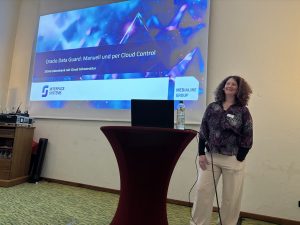
    Me at my own presentation

    Once I had finished my presentation, I could finally relax and enjoy the remaining sessions.

    I joined Markus Michalewicz’s talk on
    Die wichtigsten Oracle AI Database HochverfĂŒgbarkeits-Funktionen im Überblick
    It was a great presentation with useful insights into MAA and the new Platinum level.

    After that, I attended Stefan Oehrli’s session
    Oracle Database 26ai On-Premises: New Security Features – Insights & Demos
    He gave a good overview of SQL Firewall, as well as new roles and privilege concepts.
    One of my favorite features is the ability to grant read access, for example, to all existing and future tables in a database schema.

    I then followed him to his next session,
    Einstieg in Oracle Database Multi-Factor Authentication (MFA)
    He explained what is already possible today, how it works, and in which scenarios MFA really makes sense.

    My last session of the day was Daniel Bollinger’s talk on
    Linux-based high availability for the Standard Edition with DRBD and Corosync
    It provided a solid overview of how to build such a setup and what steps are required to implement a reliable environment without Enterprise Edition features.

    After such a long and intense day, I was more than ready for a cold beer — and the Oracle-sponsored happy hour delivered exactly what was needed. Thanks for that!

    The evening continued with dinner, which was really good, and some great conversations with my colleagues.

    We briefly stopped by the silent disco — just to have a look — but not for too long. At some point, it was simply time to call it a day.

    Tuesday – Technical stuff

    The second day of the DOAG Database and Cloud Infrastructure conference started with Connor McDonald’s session “The Innovation Continues – More 26ai Features, More 100% Demo, Zero Slides.”
    It is always worth attending his sessions. This time, he presented new features for both developers and DBAs.
    And no matter which feature he talks about, his presentations are always interesting and entertaining.

    In HervĂ© Schweiter’s session “Secure Your Sensitive Data and Sleep Well” I got a good overview of data masking and how it can help secure your data — especially in test and development environments.

    Next up was
    Ein Bild sagt mehr als 1000 Zeilen – Oracle AWR mit PowerShell visualisieren” by Andreas Jordan.
    He explained which AWR data can be used to visualize performance metrics using PowerShell and Excel. The session focused more on the theoretical aspects, but provided useful insights.

    Then it was time for lunch — the perfect moment to meet colleagues and talk about the sessions attended so far.

    After lunch, I once again joined Markus Michalewicz’s session “Oracle AI Database 26ai On-Premises – Was Sie jetzt wissen mĂŒssen
    As always, he talked about the latest features and showed how Oracle is evolving by opening up and offering more possibilities compared to other databases.

    In my next session, “Upgrades mit dem Dampfhammer: Wenn Ansible und AutoUpgrade aufrĂ€umen
    by Martin Berger,
    I learned more about AutoUpgrade and how to automate upgrade processes using Ansible.
    His talk definitely encouraged me to take a closer look at AutoUpgrade — such a great tool! 😉

    After that, I needed a longer break — so many impressions, ideas, and new topics to process.
    So I treated myself to some ice cream and took a moment to relax in the sun.

    My last session, “OCI-Monitoring in der Entsorgungsbranche – ein Praxisbericht” by Nicole Cochems and Johannes Michler, showed the decision-making process behind choosing the right monitoring tool for a complex environment both in OCI and on-premis.
    It was a good session with real-world insights.

    Wrapping up two interesting days in Soltau

    After two intensive and inspiring days, it was time to head back home.

    Looking back, the DOAG Database and Cloud Infrastructure conference was once again a great mix of technical insights, new ideas, and, most importantly, conversations with the community.
    Events like this always remind me how strong and supportive the Oracle community is.

    I’m already looking forward to the next DOAG conference — and to seeing many familiar (and new) faces again.
  • Upgrade Grid Infrastructure 19.28 to 26.1 – Secure Boot Pitfall

    In one of my previous posts , I wrote about the installation of Grid Infrastructure 19c and some issues with the CSSD daemon.
    After fixing those problems, I decided to test an upgrade to Oracle 26ai — focusing solely on the Grid Infrastructure.

    Normally, an upgrade of the Grid Infrastructure is not a big thing, so I went ahead with it.

    Initial upgrade attempt

    First of all, I created all necessary directories for the software and unzipped the binaries into them.
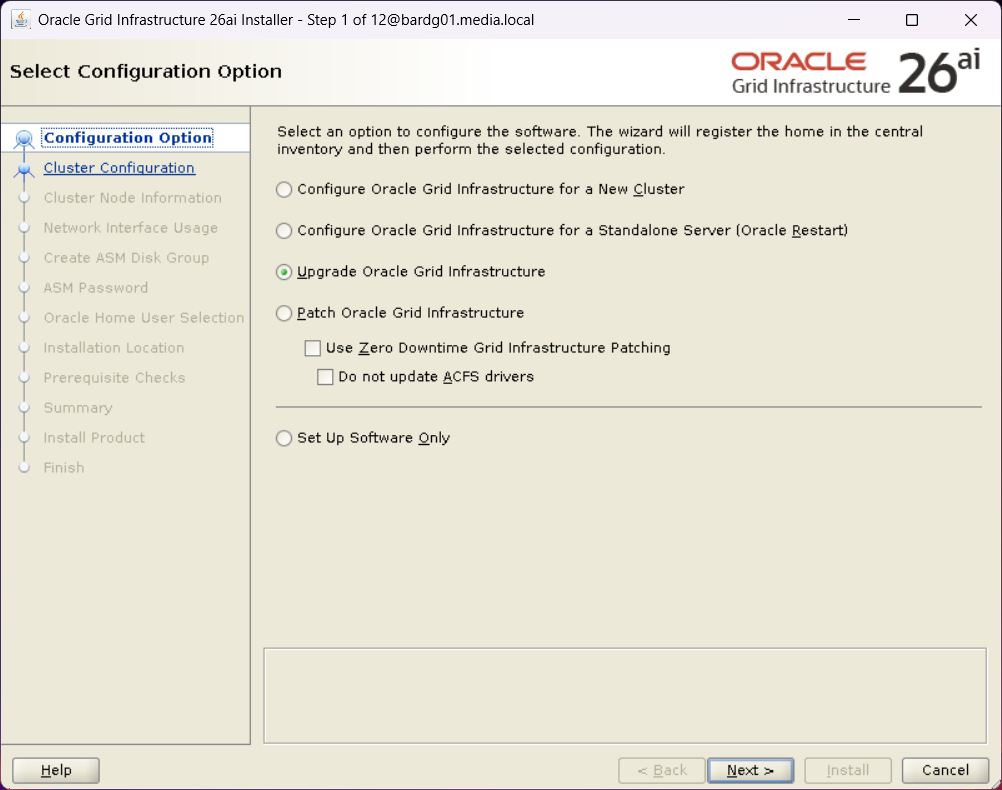
    I started the installer and followed the instructions.

    First step of Oracle Grid Infrastructure 26ai installer with "upgrade Oracle Grid Infrastructure" option selected.
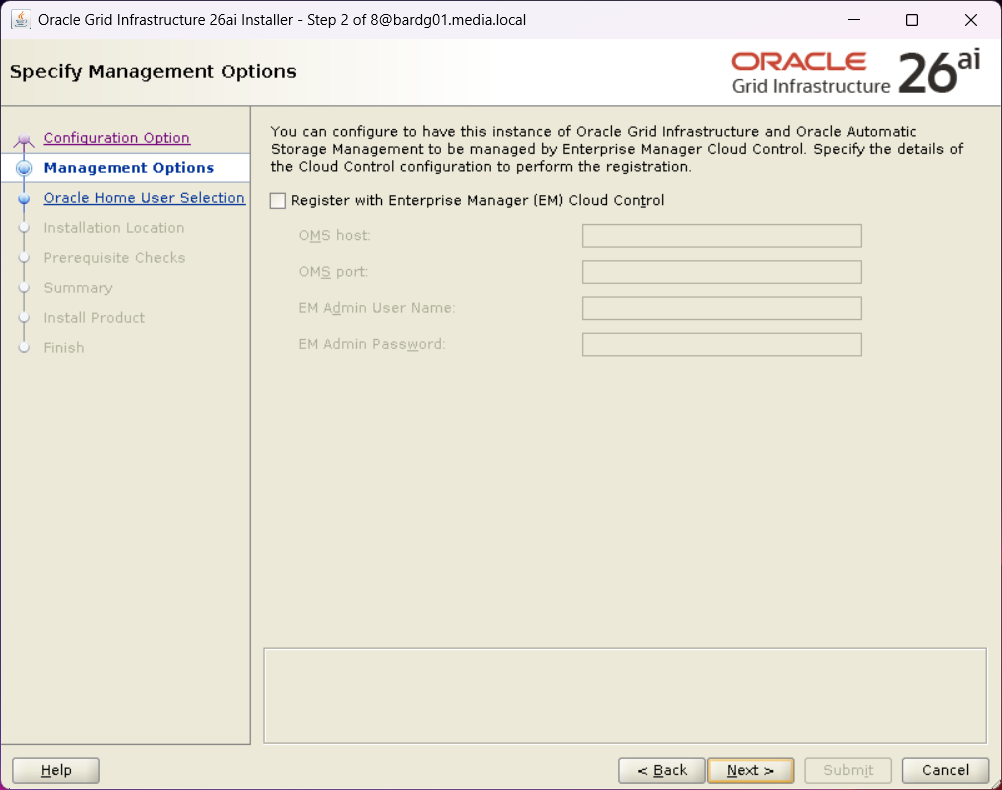
    Second step of Oracle Grid Infrastructure 26ai installer with nothing selected
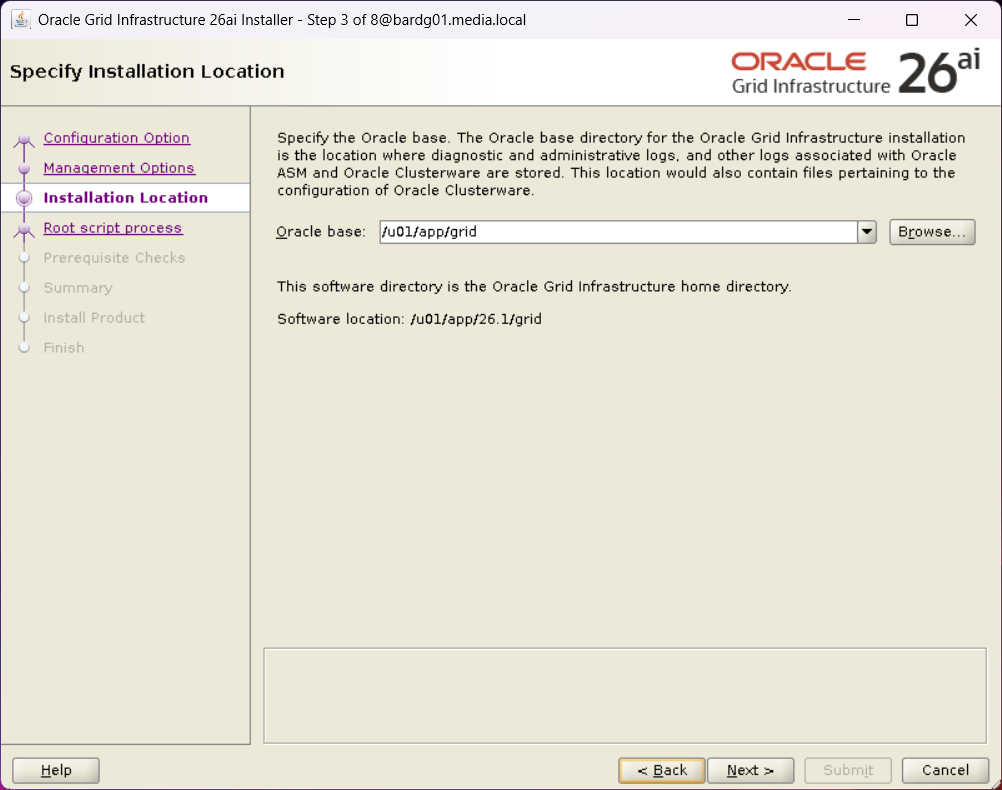
    Step 3 of the Oracle Grid Infrastructure 26ai installer with Oracle Base specified.
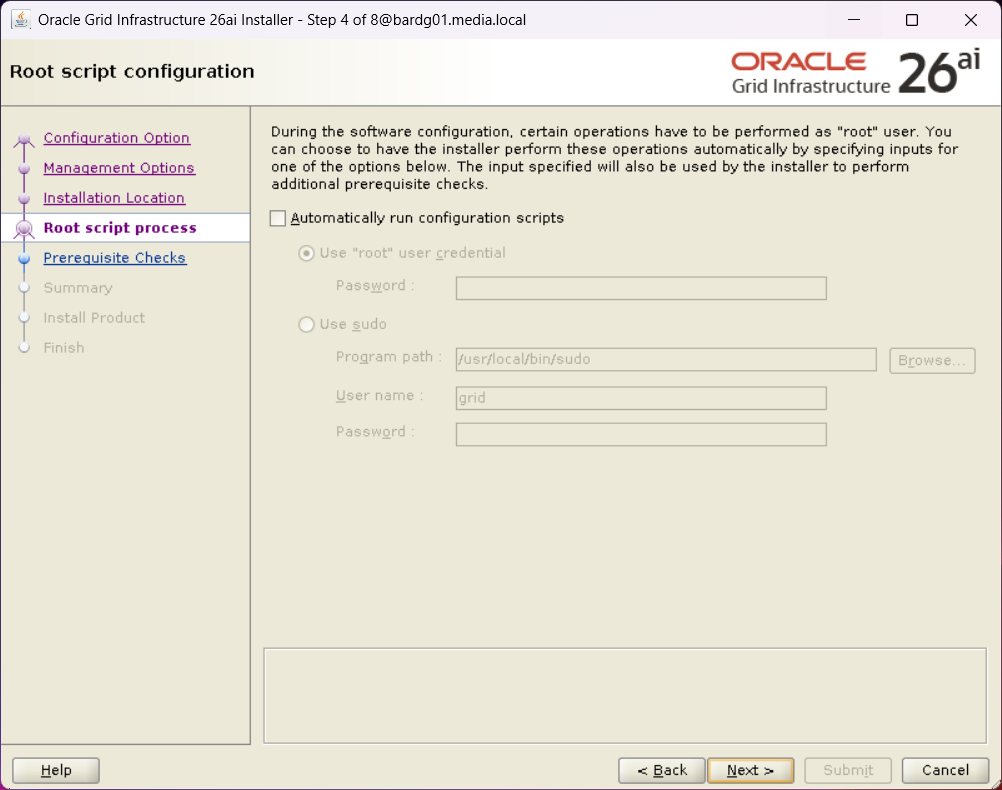
    Step 4 of the Oracle Grid Infrastructure 26ai installer without selection of "Automatically run configuration scripts"
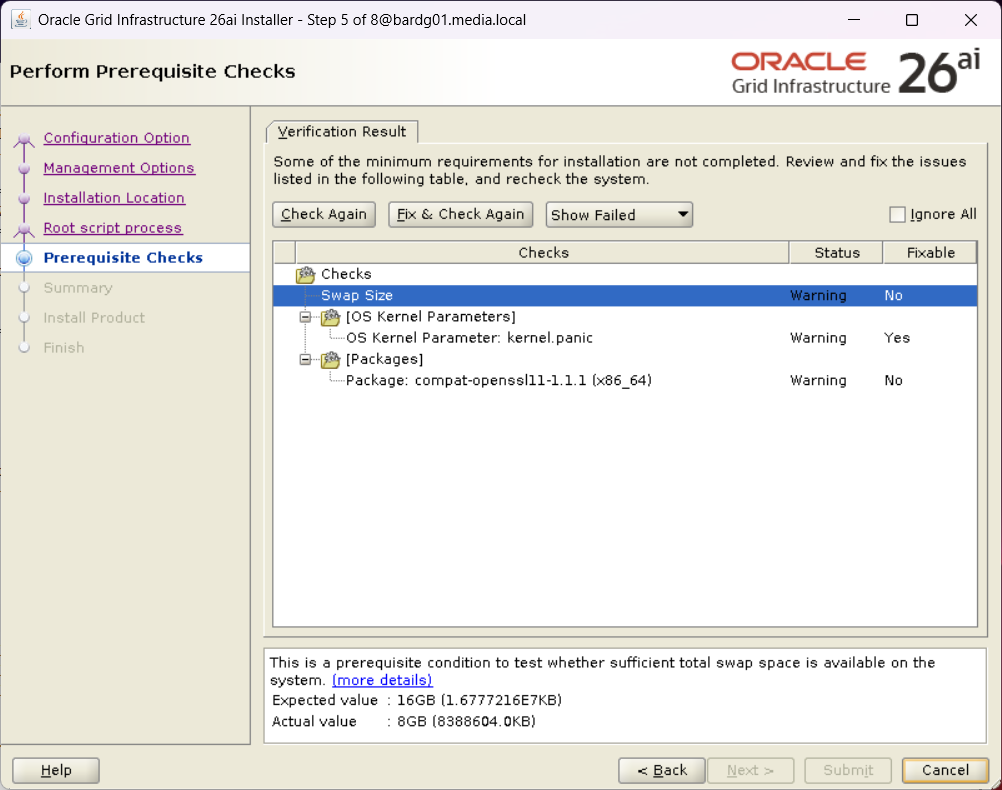
    Step 5 of the Oracle Grid Infrastructure 26ai installer with the results of the prerequisite checks.

    I installed compat-openssl11, and I ignored the other both warning.

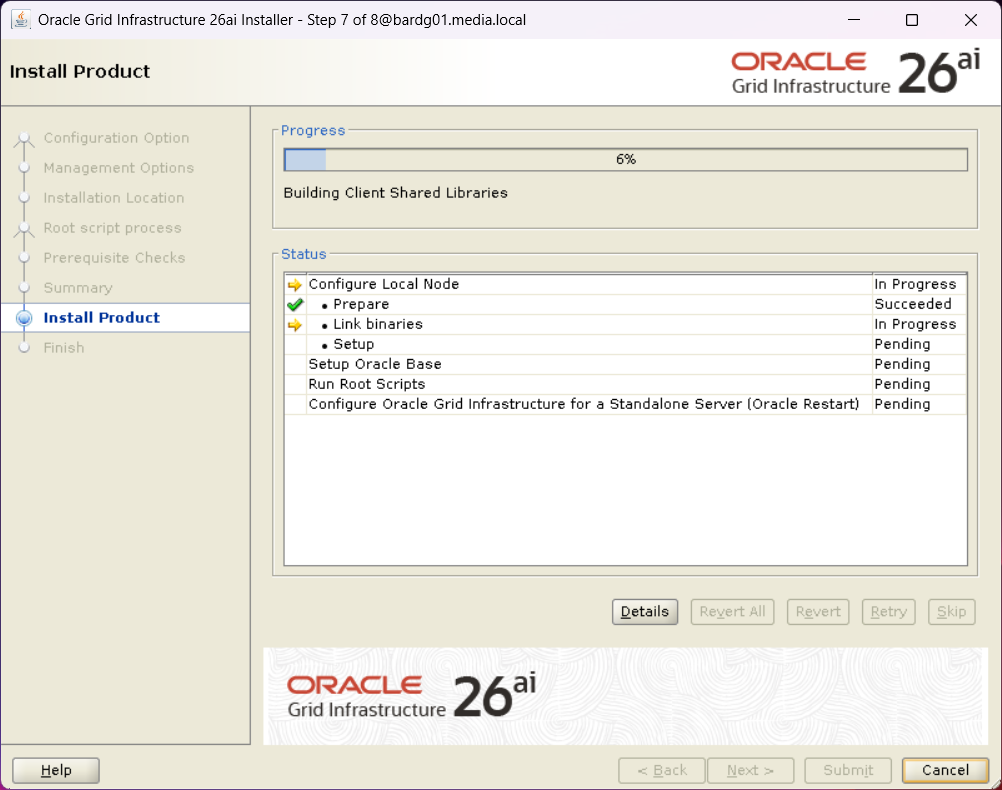
    Step 7 of the Oracle Grid Infrastructure 26ai installer showing the installation progress
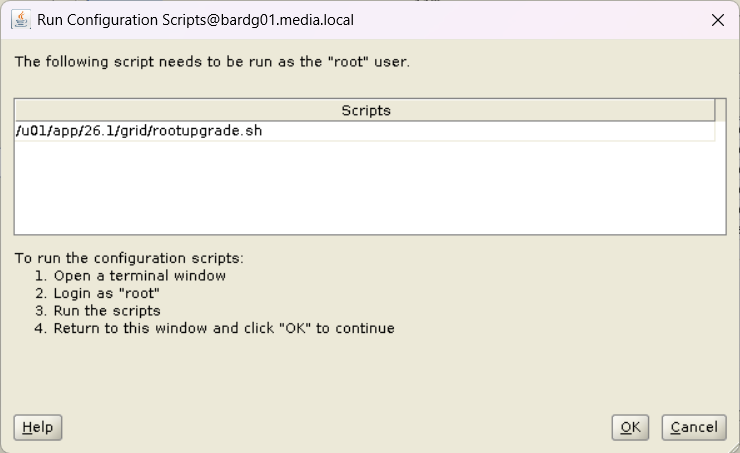
    An important step in he Oracle Grid Infrastructure 26ai installer prompting to run the rootupgrade.sh script

    Nothing unexpected so far, but when I ran rootupgrade.sh as user root, I encountered an error close to the end.

    [root@bardg01 ~]$  /u01/app/26.1/grid/rootupgrade.sh
    Performing root user operation.
    
    The following environment variables are set as:
        ORACLE_OWNER= grid
        ORACLE_HOME=  /u01/app/26.1/grid
    
    Enter the full pathname of the local bin directory: [/usr/local/bin]:
    The contents of "dbhome" have not changed. No need to overwrite.
    The file "oraenv" already exists in /usr/local/bin.  Overwrite it? (y/n)
    [n]:
    The file "coraenv" already exists in /usr/local/bin.  Overwrite it? (y/n)
    [n]:
    
    Entries will be added to the /etc/oratab file as needed by
    Database Configuration Assistant when a database is created
    Finished running generic part of root script.
    Now product-specific root actions will be performed.
    Executing command '/u01/app/26.1/grid/perl/bin/perl -I/u01/app/26.1/grid/perl/lib -I/u01/app/26.1/grid/crs/install /u01/app/26.1/gr                              id/crs/install/roothas.pl  -upgrade'
    Using configuration parameter file: /u01/app/26.1/grid/crs/install/crsconfig_params
    The log of current session can be found at:
      /u01/app/grid/crsdata/bardg01/crsconfig/roothas_2026-04-28_02-52-43PM.log
    2026/04/28 14:52:44 CLSRSC-595: Executing upgrade step 1 of 11: 'UpgPrechecks'.
    acfsutil info fs: ACFS-03036: no mounted ACFS file systems
    2026/04/28 14:52:47 CLSRSC-595: Executing upgrade step 2 of 11: 'GetOldConfig'.
    2026/04/28 14:52:50 CLSRSC-595: Executing upgrade step 3 of 11: 'GenSiteGUIDs'.
    2026/04/28 14:52:50 CLSRSC-595: Executing upgrade step 4 of 11: 'SetupOSD'.
    2026/04/28 14:52:50 CLSRSC-595: Executing upgrade step 5 of 11: 'PreUpgrade'.
    2026/04/28 14:53:02 CLSRSC-595: Executing upgrade step 6 of 11: 'UpgradeOLR'.
    clscfg: EXISTING configuration version 0 detected.
    Creating OCR keys for user 'grid', privgrp 'oinstall'..
    Operation successful.
    2026/04/28 14:53:06 CLSRSC-595: Executing upgrade step 7 of 11: 'UpgradeOCR'.
    LOCAL ONLY MODE
    Successfully accumulated necessary OCR keys.
    Creating OCR keys for user 'root', privgrp 'root'..
    Operation successful.
    CRS-4664: Node bardg01 successfully pinned.
    2026/04/28 14:53:10 CLSRSC-595: Executing upgrade step 8 of 11: 'CreateOHASD'.
    2026/04/28 14:53:11 CLSRSC-595: Executing upgrade step 9 of 11: 'ConfigOHASD'.
    2026/04/28 14:53:19 CLSRSC-329: Replacing Clusterware entries in file 'oracle-ohasd.service'
    2026/04/28 14:53:27 CLSRSC-595: Executing upgrade step 10 of 11: 'UpgradeSIHA'.
    
    bardg01     2026/04/28 14:54:13     /u01/app/grid/crsdata/bardg01/olr/backup_20260428_145413.olr     2107015493
    
    bardg01     2026/04/20 12:35:05     /u01/app/grid/crsdata/bardg01/olr/backup_20260420_123505.olr     1643218082
    2026/04/28 14:54:14 CLSRSC-595: Executing upgrade step 11 of 11: 'InstallACFS'.
    2026/04/28 14:54:37 CLSRSC-400: A system reboot is required to continue installing.
    Died at /u01/app/26.1/grid/crs/install/oraacfs.pm line 3315.

    I was a bit surprised, as ACFS was not in use on this system.

    ACFS driver error during upgrade

    Looking into the log file, I found the following entries:

    (
)
    >  ACFS-9154: Loading 'oracleoks.ko' driver.
    >  ACFS-9176: Entering 'mpr'
    >  ACFS-9177: Return from 'mpr'
    >  ACFS-9109: oracleoks.ko driver failed to load.
    >  ACFS-9178: Return code = USM_FAIL
    >  ACFS-9177: Return from 'ld usm drvs'
    >  ACFS-9428: Failed to load ADVM/ACFS drivers. A system reboot is recommended.
    >  ACFS-9310: ADVM/ACFS installation failed.
    >  ACFS-9178: Return code = USM_REBOOT_RECOMMENDED
    >  ACFS-9176: Entering 'count drivers'
    (
)

    As mentioned before, ACFS was not in use.

    After searching the web and MOS, I found the following MOS note:

    KB122579: [RAC] Root.sh or Postpatch Failed To Load ACFS Driver
    “ACFS-9428: Failed to load ADVM/ACFS drivers”

    Although this system was not an RAC, it is Grid Infrastructure, and the error described there was very similar.

    Two workarounds were mentioned:

    • Disable ACFS
    • Disable Secure Boot

    Disabling ACFS did not help. The error remained the same.

    So I focused on Secure Boot.

    Secure Boot as Root Cause

    [root@bardg01 ~]$  mokutil --sb-state
    SecureBoot enabled

    I disabled Secure Boot:

    [root@bardg01 ~]$  mokutil --disable-validation
    password length: 8~16
    input password:
    input password again:
    [root@bardg01 ~]$  reboot

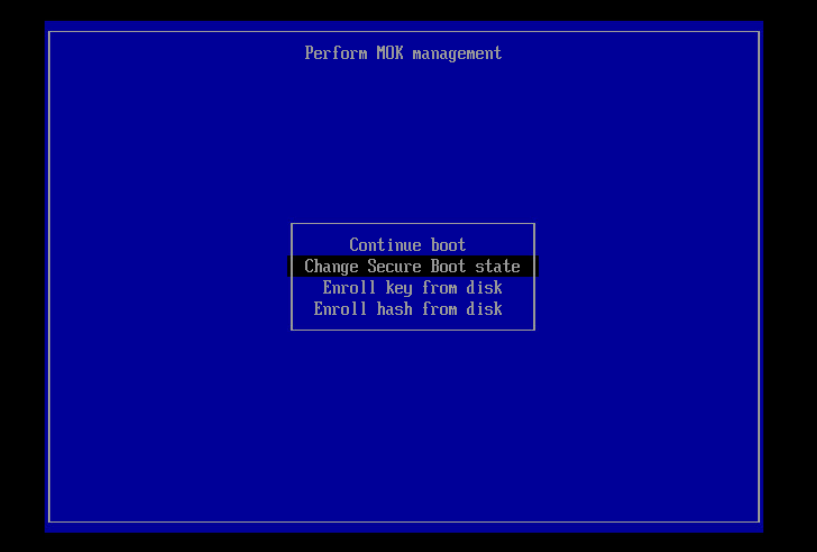
    During the next boot, Secure Boot must be disabled via the boot menu (see screenshot below).

    Disabling the BIOS setting for Secure Boot

    After the reboot, I checked the Secure Boot status again:

    [root@bardg01 ~]$  mokutil --mokutil --sb-state
    SecureBoot enabled
    SecureBoot validation is disabled in shim

    Following the recommendation from the MOS note, I manually loaded the ACFS driver:

    [root@bardg01 ~]$  /u01/app/19.28/grid/bin/acfsload start
    ACFS-9391: Checking for existing ADVM/ACFS installation.
    ACFS-9392: Validating ADVM/ACFS installation files for operating system.
    ACFS-9393: Verifying ASM Administrator setup.
    ACFS-9308: Loading installed ADVM/ACFS drivers.
    ACFS-9325:     Driver OS kernel version = 5.15.0-201.135.6.el9uek.x86_64.
    ACFS-9326:     Driver build number = 250406.
    ACFS-9231:     Driver build version = 19.0.0.0.0 (19.28.0.0.0).
    ACFS-9547:     Driver available build number = 250406.
    ACFS-9232:     Driver available build version = 19.0.0.0.0 (19.28.0.0.0).
    ACFS-9549:     Kernel and command versions.
    Kernel:
        Build version: 19.0.0.0.0
        Build full version: 19.28.0.0.0
        Build hash:    9256567290
        Bug numbers:   NoTransactionInformation
    Commands:
        Build version: 19.0.0.0.0
        Build full version: 19.28.0.0.0
        Build hash:    9256567290
        Bug numbers:   NoTransactionInformation
    ACFS-9327: Verifying ADVM/ACFS devices.
    ACFS-9156: Detecting control device '/dev/asm/.asm_ctl_spec'.
    ACFS-9156: Detecting control device '/dev/ofsctl'.
    ACFS-9294: updating file /etc/sysconfig/oracledrivers.conf
    ACFS-9322: completed

    The driver was loaded successfully:

    [root@bardg01 ~]$  /u01/app/19.28/grid/bin/acfsdriverstate loaded
    ACFS-9203: true

    After that, I started the installer again and reran rootupgrade.sh.

    [root@bardg01 ~]$  /u01/app/26.1/grid/rootupgrade.sh

    This time, the script completed successfully.

    (...)
    2026/04/30 11:35:27 CLSRSC-595: Executing upgrade step 11 of 11: 'InstallACFS'.
    2026/04/30 11:36:02 CLSRSC-327: Successfully configured Oracle Restart for a standalone server

    I then re-enabled Secure Boot:

    [root@bardg01 ~]$  mokutil --enable-validation
    password length: 8~16
    input password:
    input password again:
    [root@bardg01 ~]$  reboot

    After the reboot, Grid Infrastructure started normally.

    grid@bardg01 ~> which crsctl
    /u01/app/26.1/grid/bin/crsctl
    grid@bardg01 ~> crsctl stat res -t
    --------------------------------------------------------------------------------
    Name           Target  State        Server                   State details
    --------------------------------------------------------------------------------
    Local Resources
    --------------------------------------------------------------------------------
    ora.LISTENER.lsnr
                   ONLINE  ONLINE       bardg01                  STABLE
    ora.ons
                   OFFLINE OFFLINE      bardg01                  STABLE
    --------------------------------------------------------------------------------
    Cluster Resources
    --------------------------------------------------------------------------------
    ora.cssd
          1        ONLINE  ONLINE       bardg01                  STABLE
    ora.demodb_bardg01.db
          1        ONLINE  ONLINE       bardg01                  Open,HOME=/u01/app/o
                                                                 racle/product/19.28/
                                                                 db_home1,STABLE
    ora.diskmon
          1        OFFLINE OFFLINE                               STABLE
    ora.evmd
          1        ONLINE  ONLINE       bardg01                  STABLE
    --------------------------------------------------------------------------------
    grid@bardg02 ~> crsctl query has releaseversion
    Oracle High Availability Services release version on the local node is [23.0.0.0.0]

    Lessons Learned

    However, this approach is obviously not suitable for customers, and certainly not for a production environment.

    I discussed this issue with a colleague, and he asked the right question:
    Which OS version are you using?

    The system was running Oracle Linux 9.4.

    After upgrading the OS to Oracle Linux 9.7, the upgrade from 19c to 26ai completed successfully without any errors.

    And what can I say? In the end, it wasn’t a Grid Infrastructure issue at all, but yet another reminder that patching the OS actually matters.

    Mike Dietrich is absolutely right when he says: patch, patch, patch
    (Patch your databases against AI-enabled cybersecurity threats)

  • Oracle AI Database Administration Certified Professional – How I passed and how you can too

    Initially, I planned to certify as Oracle Database 19c OCP.
    19c is still the long-term release and is still used in many environments.
    And it’s been a really long time since I earned my 12c certification.

    However, while preparing my learning path, I asked myself a simple question:
    Wouldn’t it make more sense to get certified for the new 26ai, which is finally available on‑premises?

    So instead of certifying on an established platform, I decided to focus on what comes next and went for the Oracle AI Database Administration Certified Professional, based on Oracle Database 23ai / 26c.

    After about three to four weeks of preparation, I passed the exam yesterday.
    This post summarizes my preparation for the exam and highlights the topics that should be paid particular attention to.

    Preparation Strategy

    My preparation took approximately three to almost four weeks. The effort should not be underestimated; this is not an exam you pass without focused study.

    So, what was my preparation?

    I read the documentation “Oracle AI Database – New Features for Administrators”

    This documentation is a good reference point for understanding which features Oracle considers relevant for database administrators today.
    It contains topics like AI Vector Search, which was really new for me, Application Deployment (including JSON), and much more.

    Furthermore, I watched the following course on mylearn.oracle.com:

    Oracle AI Database – New Features for Administrators

    This course covers additional interesting topics such as True Cache, several chapters on performance tuning and Oracle advisors, migration topics, and more.

    So, if you have the possibility to watch this course – do it 😉

    The course also includes a Student Guide and an Activity Guide, and you can request your own lab so that you can practice hands‑on.

    If you cannot watch the mentioned course, you might want to try the Oracle LiveLabs:
    https://livelabs.oracle.com/ords/r/dbpm/livelabs/view-workshop?wid=3950

    There is the possibility to perform all exercises in your own environment.
    I did not use this specific lab, but all LiveLabs I have used so far were of good quality.

    So, try, try, try.
    Especially topics like multitenant management, RMAN recovery, or PDB relocation only really “stick” when you perform them yourself.

    Exam focus areas – what really matters

    I obviously cannot share actual exam questions, but I can share my observations regarding topic focus.

    Performance Tuning

    • AWR
    • ADDM
    • Advisors
    • Performance analysis in CDB vs. PDB context

    Understanding where and how to analyze performance is essential.

    Multitenant – The core topic

    No surprise here: Multitenant is no longer optional.

    Important areas include:

    • PDB relocate
    • Transportable PDBs
    • Clear understanding of CDB and PDB separation

    RMAN Backups in Multitenant Architectures

    Expect questions about:

    • CDB‑level backups
    • PDB‑level restore and recovery
    • Conceptual understanding, not just RMAN commands

    Application Containers

    • They do appear
    • For me: one to three questions

    You should know the idea and the basic administration concepts.

    Security Topics

    • Some security‑related questions
    • In my case: no SQL Firewall
    • Focus was on general security concepts and architecture

    Installation and upgrades

    • AutoUpgrade
    • DBCA
    • Grid Infrastructure

    Who should consider this certification?

    In my opinion, this certification is well suited for DBAs who:

    • already hold an Oracle OCP (e.g. 12c or 19c)
    • work regularly with multitenant environments
    • want to stay aligned with Oracle’s future database direction

    Conclusion

    This certification requires time and focus. It should be planned and supported accordingly.

    For database administrators, it provides:

    • a consolidated understanding of Oracle Database architecture
    • updated knowledge
    • formal validation of expertise

    For employers, certified administrators represent:

    • reduced operational risk
    • verified skill levels
    • stronger positioning for future Oracle Database projects

    From this perspective, Oracle certification is a clear win‑win situation.

  • PRCD‑1024 and PRCR‑1055 After Creating a Standby Database with Oracle Restart

    In preparation for my presentation at the DOAG Database with Cloud Infrastructure (#DOAGDB26) conference, I built a small Data Guard test environment and created the standby database using Oracle Enterprise Manager (OEM).

    After creating a physical standby database via Oracle Enterprise Manager and registering it with Oracle Restart, srvctl commands failed with:

    PRCD-1024 : Failed to retrieve instance list for database DEMODB_BARDG02
    PRCR-1055 : Cluster membership check failed for node bardg02

    The setup of my environment was done as follows:

    1. Created a virtual machine named bardg01
    2. Installed Oracle Enterprise Linux 9.4
    3. Copied the gold images for:
      Oracle Grid Infrastructure 19.28
      Oracle Database 19.28
    4. Unzipped both into their respective directories
    5. Installed the required oracle-database-preinstall-* packages
    6. Configured the grid user

    After that, I cloned the VM, adjusted the network configuration, and two identical systems were available:

    • bardg01
    • bardg02

    Grid Infrastructure and Database Installation

    bardg01

    On bardg01, I installed Oracle Grid Infrastructure for Standalone Server (Oracle Restart) without ASM.

    I performed a software‑only installation and configured Oracle Restart afterwards.
    The installation completed without issues.

    After that, I installed the RDBMS software and created a database using DBCA.
    Everything worked as expected.

    bardg02

    On bardg02, I repeated the same Grid Infrastructure and RDBMS installation steps.
    At this stage, I did not create a database.

    Creating the Standby Database with OEM

    After installing the OEM agents on both hosts, I created a physical standby database via OEM.

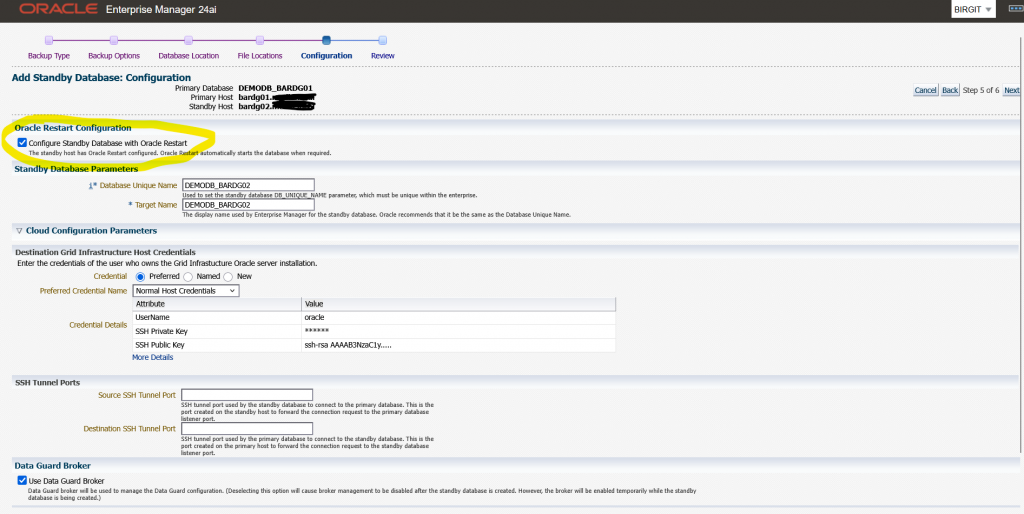
    During the wizard I selected the option to “Configure Standby Database with Oracle Restart”
    See the image below:

    The OEM job finished successfully.
    However, after reviewing the environment, I noticed that:

    • The standby database was registered with Oracle Restart
    • The database itself was running, but was shown as offline
    grid@bardg02 ~> crsctl stat res -t
    --------------------------------------------------------------------------------
    Name           Target  State        Server                   State details
    --------------------------------------------------------------------------------
    Local Resources
    --------------------------------------------------------------------------------
    ora.LISTENER.lsnr
                   ONLINE  ONLINE       bardg02                  STABLE
    ora.ons
                   OFFLINE OFFLINE      bardg02                  STABLE
    --------------------------------------------------------------------------------
    Cluster Resources
    --------------------------------------------------------------------------------
    ora.cssd
          1        OFFLINE OFFLINE                               STABLE
    ora.demodb_bardg02.db
          1        OFFLINE OFFLINE                               STABLE
    ora.diskmon
          1        OFFLINE OFFLINE                               STABLE
    ora.evmd
          1        ONLINE  ONLINE       bardg02                  STABLE
    --------------------------------------------------------------------------------

    At this point, I simply wanted to check the status of the standby database.

    oracle@bardg02 ~> . oraenv
    ORACLE_SID = [DEMODB] ? DEMODB
    The Oracle base remains unchanged with value /u01/app/oracle
    oracle@bardg02 ~> srvctl status database -db demodb_bardg02
    PRCD-1024 : Failed to retrieve instance list for database DEMODB_BARDG02
    PRCR-1055 : Cluster membership check failed for node bardg02

    In my environment, every srvctl command on this host resulted in the same error combination.
    On my primary host bardg01 every srvctl command was successful.

    At this point, I verified a few things:

    • The Grid Infrastructure installation had completed without errors
    • I had not manually changed the CSSD configuration
    • On both hosts, cssd was OFFLINE

    I searched online and in MOS and came to the conclusion that this error pair is typically triggered by cluster membership checks performed by srvctl, even in Oracle Restart setups without ASM.

    Starting CSSD

    My next test was to start CSSD, and I configured it to start automatically after reboot.

    grid@bardg02 ~> crsctl modify resource ora.cssd -attr "AUTO_START=always" -unsupported
    grid@bardg02 ~> crsctl start res ora.cssd -unsupported
    grid@bardg02 ~> crsctl stop has
    CRS-2791: Starting shutdown of Oracle High Availability Services-managed resources on 'bardg02'
    CRS-2673: Attempting to stop 'ora.LISTENER.lsnr' on 'bardg02'
    CRS-2677: Stop of 'ora.LISTENER.lsnr' on 'bardg02' succeeded
    CRS-2673: Attempting to stop 'ora.evmd' on 'bardg02'
    CRS-2677: Stop of 'ora.evmd' on 'bardg02' succeeded
    CRS-2793: Shutdown of Oracle High Availability Services-managed resources on 'bardg02' has completed
    CRS-4133: Oracle High Availability Services has been stopped.
    
    grid@bardg02 ~> crsctl start has
    CRS-4123: Oracle High Availability Services has been started.
    
    grid@bardg02 ~> crsctl stat res -t
    --------------------------------------------------------------------------------
    Name           Target  State        Server                   State details
    --------------------------------------------------------------------------------
    Local Resources
    --------------------------------------------------------------------------------
    ora.LISTENER.lsnr
                   ONLINE  ONLINE       bardg02                  STABLE
    ora.ons
                   OFFLINE OFFLINE      bardg02                  STABLE
    --------------------------------------------------------------------------------
    Cluster Resources
    --------------------------------------------------------------------------------
    ora.cssd
          1        ONLINE  ONLINE       bardg02                  STABLE
    ora.demodb_bardg02.db
          1        ONLINE  INTERMEDIATE bardg02                  Mounted (Closed),HOM
                                                                 E=/u01/app/oracle/pr
                                                                 oduct/19.28/db_home1
                                                                 ,STABLE
    ora.diskmon
          1        OFFLINE OFFLINE                               STABLE
    ora.evmd
          1        ONLINE  ONLINE       bardg02                  STABLE
    --------------------------------------------------------------------------------

    After that I retried the srvctl command:

    oracle@bardg02 ~> srvctl status database -db DEMODB_BARDG02
    Database is running.

    Attribute HOSTING_MEMBERS

    To better understand the behaviour, I ran some additional tests with the database resource attribute HOSTING_MEMBERS.

    grid@bardg02 ~> crsctl modify resource "ora.demodb_bardg02.db" -attr "HOSTING_MEMBERS=" -unsupported
    grid@bardg02 ~> crsctl stat res ora.demodb_bardg02.db -f |grep HOSTING_
    HOSTING_MEMBERS=

    All srvctl commands ran successfully

    oracle@bardg02 ~> srvctl status database -db DEMODB_BARDG02
    Database is running.
    oracle@bardg02 ~> srvctl stop database -db DEMODB_BARDG02
    oracle@bardg02 ~> srvctl status database -db DEMODB_BARDG02
    Database is not running.
    oracle@bardg02 ~> srvctl start database -db DEMODB_BARDG02
    oracle@bardg02 ~> srvctl status database -db DEMODB_BARDG02
    Database is running.

    With this configuration the database could be managed even when cssd was OFFLINE.

    Next test:

    1. HOSTING_MEMBERS=bardg02
    2. cssd = OFFLINE

    All srvctl commands failed again with:

    PRCD-1024 : Failed to retrieve instance list for database demodb_bardg02
    PRCR-1055 : Cluster membership check failed for node bardg02

    Next test:

    1. HOSTING_MEMBERS=bardg02
    2. cssd = ONLINE

    All srvctl commands ran successfully

    Conclusion

    Based on my tests, I can conclude the following:

    • After installing Grid Infrastructure for a standalone server, cssd may initially be OFFLINE
    • Databases created with DBCA work without issues
    • Databases added later (for example via OEM Data Guard) can fail with PRCD‑1024 / PRCR‑1055 if cssd is not running
    • When HOSTING_MEMBERS is used, srvctl clearly relies on cssd, even in Oracle Restart setups without ASM.

    Recommendation

    From my perspective, there are two possible options:

    1. Start and enable CSSD
      • Ensure cssd starts automatically after reboot
      • This is the recommended and clean solution
    2. Remove HOSTING_MEMBERS from the database resource
      • This works technically
      • However, it relies on unsupported configuration changes

    My recommendation:
    After installing Oracle Grid Infrastructure for a standalone server, always verify that CSSD is online and configured to start automatically.

    Hope that helps!