From ACE dinner to technical sessions and great conversations — a look back at two fully packed days.
On Monday and Tuesday, the DOAG Database & Cloud Infrastructure 2016 conference took place at Heide Park Soltau — and it didn’t disappoint. Two packed days full of very good presentations, interesting news, and, most importantly, great conversations. 😉
In this blog, I would like to share my impressions and talk about the presentations I attended.
Sunday – ACE Community and Networking
On Sunday evening, I was invited to the Oracle ACE community dinner — great people, a fantastic dinner, and, as always, good conversations with other ACEs. Afterwards, the evening continued with a “come-together,” where participants and speakers gathered for a drink and extended their discussions around AI, databases, cloud, and many other topics.
Monday – AI, High Availability, and My Presentation
After this great start on Sunday evening, Monday began with the official opening of the two conferences — DOAG Database and Cloud Infrastructure, as well as APEX Connect — by Christian Trieb, Philipp Berg, and Niels de Bruijn.
I started the day with Patrick Agreiter’s session “Smart Home, smart TV, smart car… und warum sprechen Sie nicht zu Ihrer DB?“ It was an interesting introduction to the idea of talking directly to your database using the right AI model. What I particularly liked was seeing how text can be transformed into SQL queries — and vice versa.
Next up was “Automatische Quasi-Standby mit SE2” by Kersten Bühnert. Kersten gave a practical walkthrough of how to create a refreshable PDB and use it as a kind of standby database in Oracle Standard Edition. He didn’t just show the happy path but also highlighted typical pitfalls and errors you might run into in real-life scenarios.
After that, I took a longer break — first because I wanted to have lunch, and second because I always get a bit nervous before my own presentations and need a moment to step away.
After that, I attended Stefan Oehrli’s session “Oracle Database 26ai On-Premises: New Security Features – Insights & Demos“ He gave a good overview of SQL Firewall, as well as new roles and privilege concepts. One of my favorite features is the ability to grant read access, for example, to all existing and future tables in a database schema.
After such a long and intense day, I was more than ready for a cold beer — and the Oracle-sponsored happy hour delivered exactly what was needed. Thanks for that!
The evening continued with dinner, which was really good, and some great conversations with my colleagues.
We briefly stopped by the silent disco — just to have a look — but not for too long. At some point, it was simply time to call it a day.
Tuesday – Technical stuff
The second day of the DOAG Database and Cloud Infrastructure conference started with Connor McDonald’s session “The Innovation Continues – More 26ai Features, More 100% Demo, Zero Slides.” It is always worth attending his sessions. This time, he presented new features for both developers and DBAs. And no matter which feature he talks about, his presentations are always interesting and entertaining.
In Hervé Schweiter’s session “Secure Your Sensitive Data and Sleep Well” I got a good overview of data masking and how it can help secure your data — especially in test and development environments.
Then it was time for lunch — the perfect moment to meet colleagues and talk about the sessions attended so far.
After lunch, I once again joined Markus Michalewicz’s session “Oracle AI Database 26ai On-Premises – Was Sie jetzt wissen müssen” As always, he talked about the latest features and showed how Oracle is evolving by opening up and offering more possibilities compared to other databases.
In my next session, “Upgrades mit dem Dampfhammer: Wenn Ansible und AutoUpgrade aufräumen” by Martin Berger, I learned more about AutoUpgrade and how to automate upgrade processes using Ansible. His talk definitely encouraged me to take a closer look at AutoUpgrade — such a great tool! 😉
After that, I needed a longer break — so many impressions, ideas, and new topics to process. So I treated myself to some ice cream and took a moment to relax in the sun.
My last session, “OCI-Monitoring in der Entsorgungsbranche – ein Praxisbericht” by Nicole Cochems and Johannes Michler, showed the decision-making process behind choosing the right monitoring tool for a complex environment both in OCI and on-premis. It was a good session with real-world insights.
Wrapping up two interesting days in Soltau
After two intensive and inspiring days, it was time to head back home.
Looking back, the DOAG Database and Cloud Infrastructure conference was once again a great mix of technical insights, new ideas, and, most importantly, conversations with the community. Events like this always remind me how strong and supportive the Oracle community is.
I’m already looking forward to the next DOAG conference — and to seeing many familiar (and new) faces again.
In one of my previous posts , I wrote about the installation of Grid Infrastructure 19c and some issues with the CSSD daemon. After fixing those problems, I decided to test an upgrade to Oracle 26ai — focusing solely on the Grid Infrastructure.
Normally, an upgrade of the Grid Infrastructure is not a big thing, so I went ahead with it.
Initial upgrade attempt
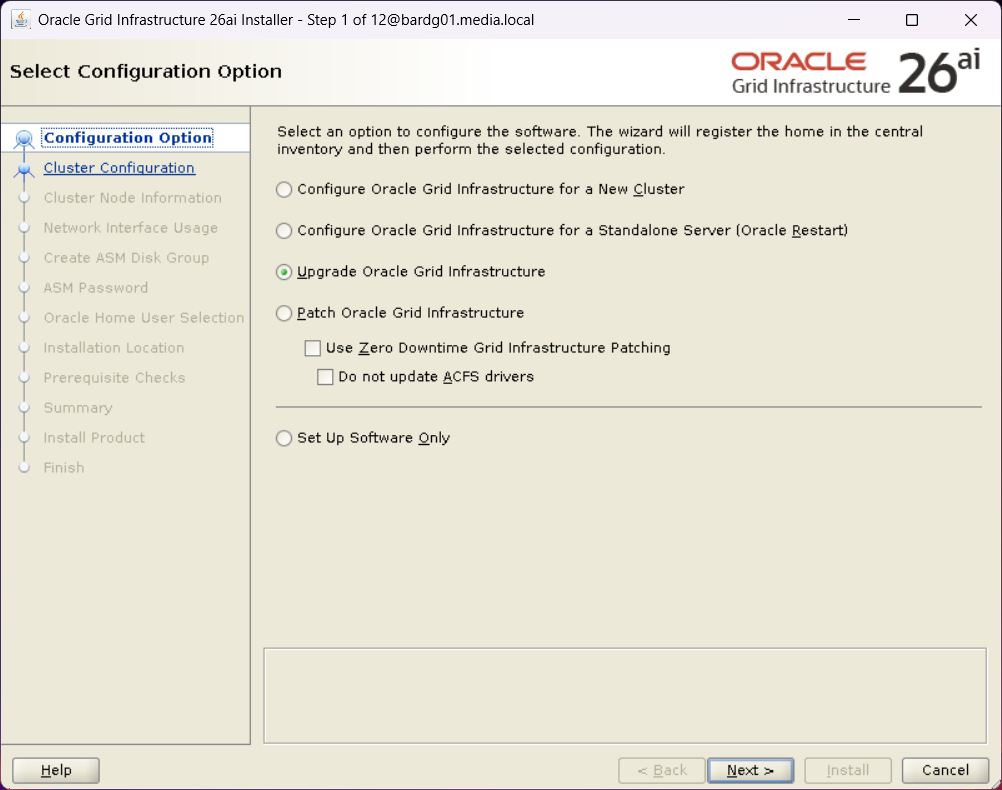
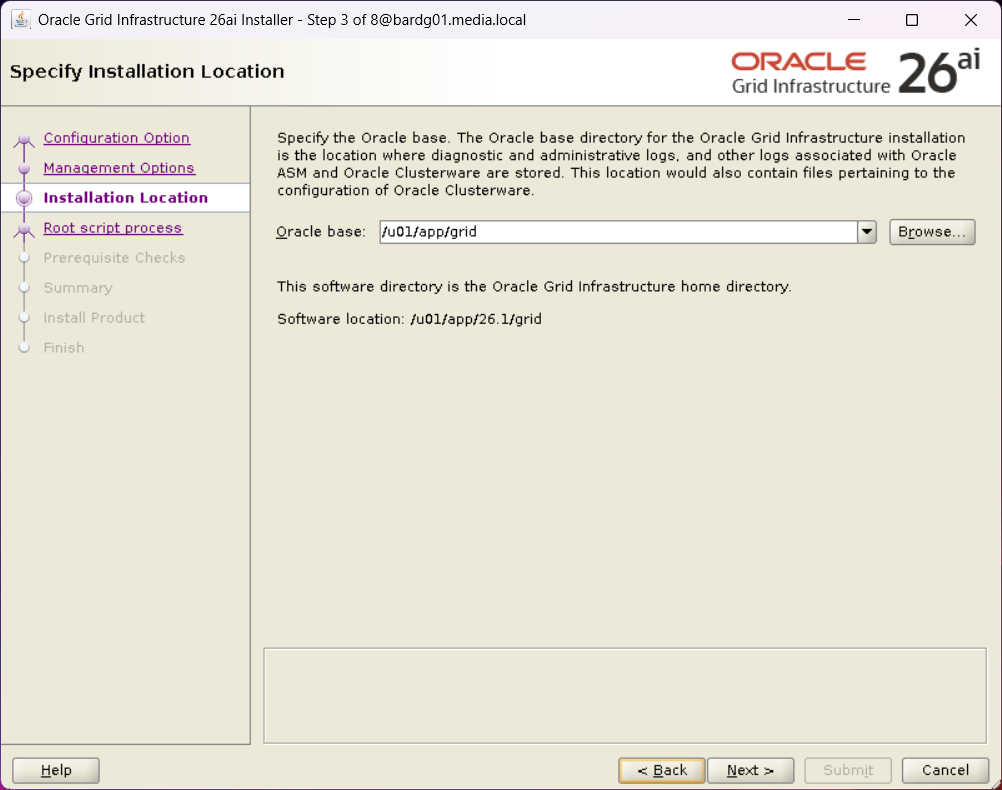
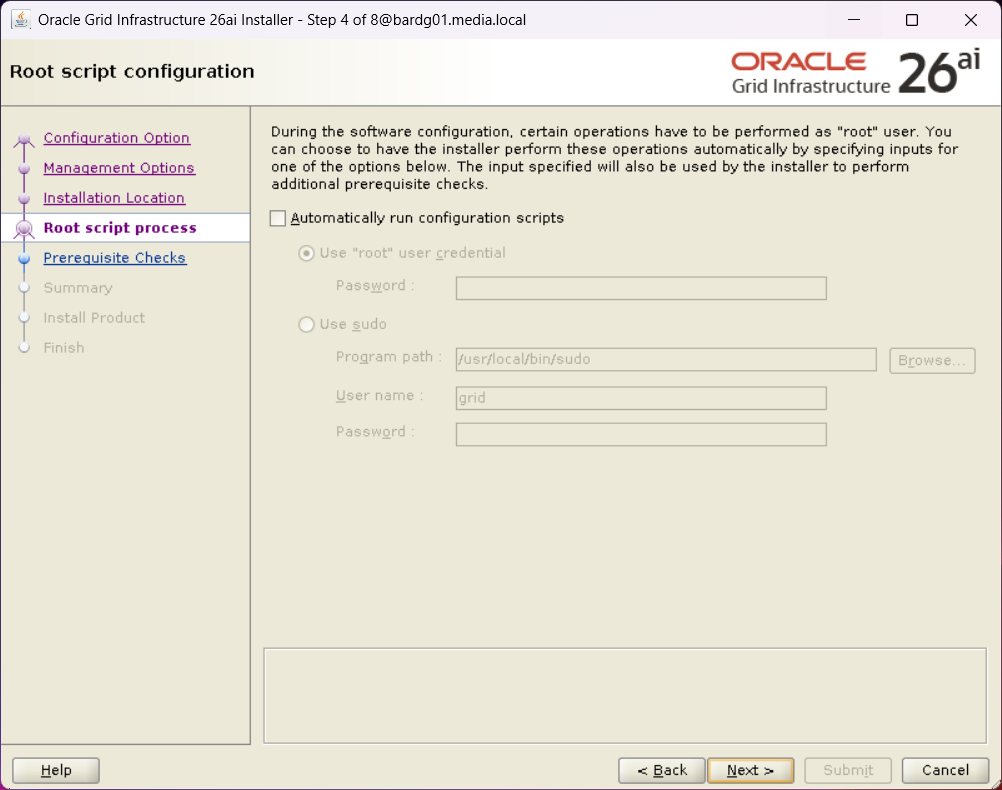
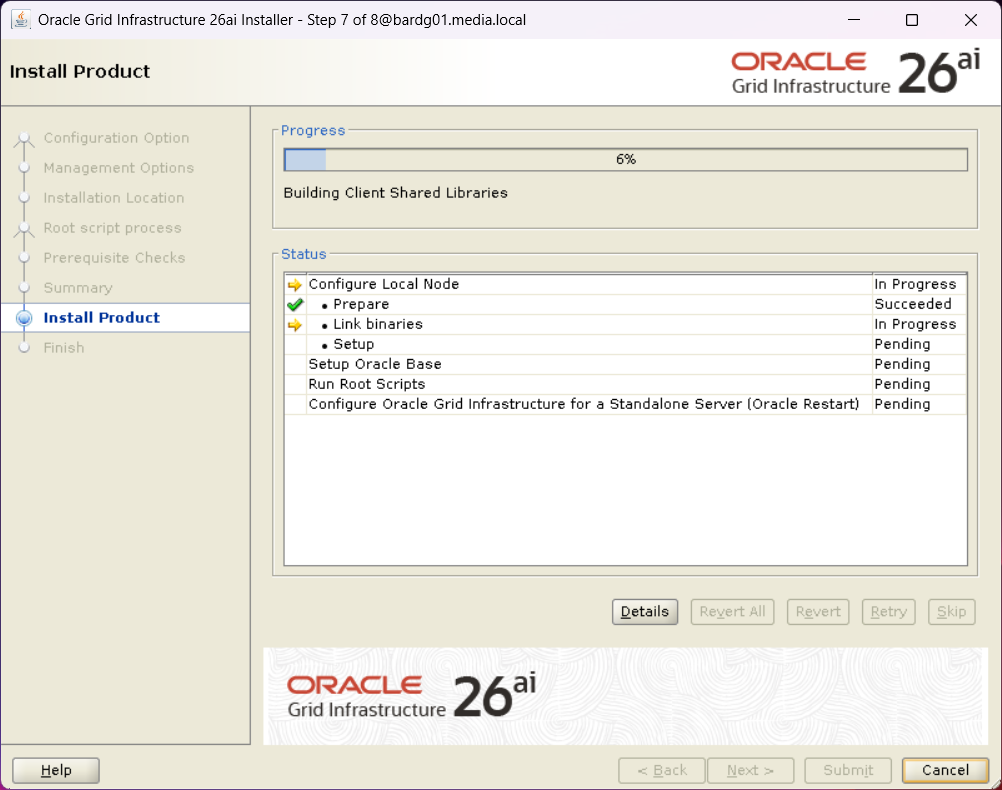
First of all, I created all necessary directories for the software and unzipped the binaries into them. I started the installer and followed the instructions.
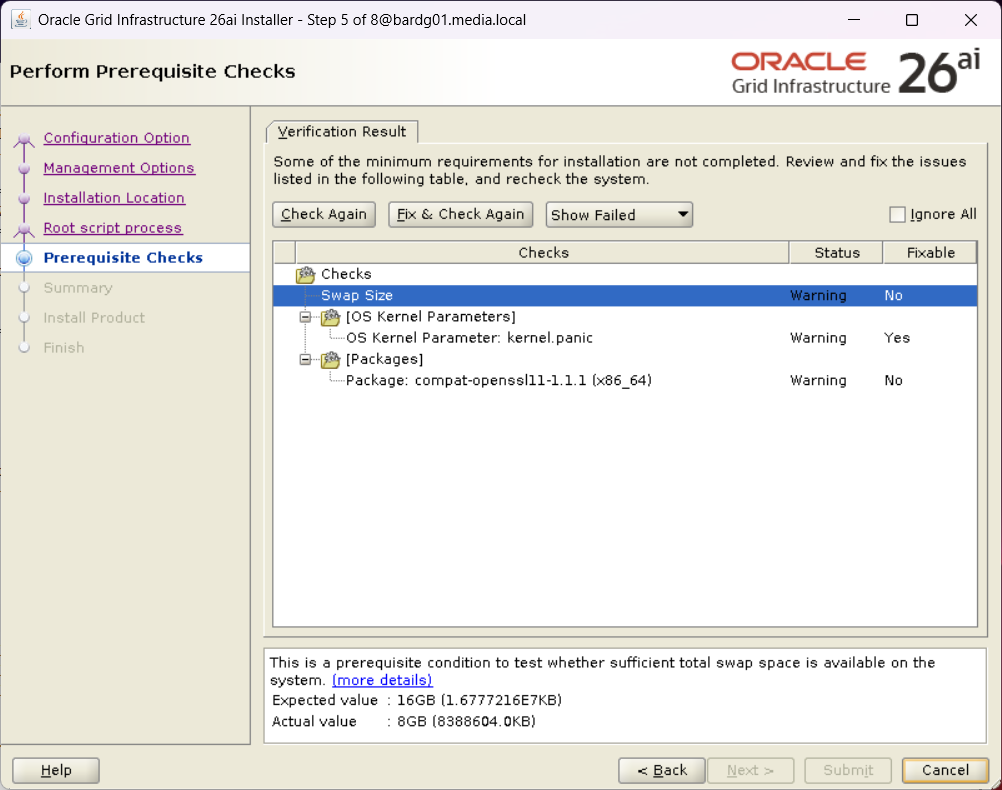
I installed compat-openssl11, and I ignored the other both warning.
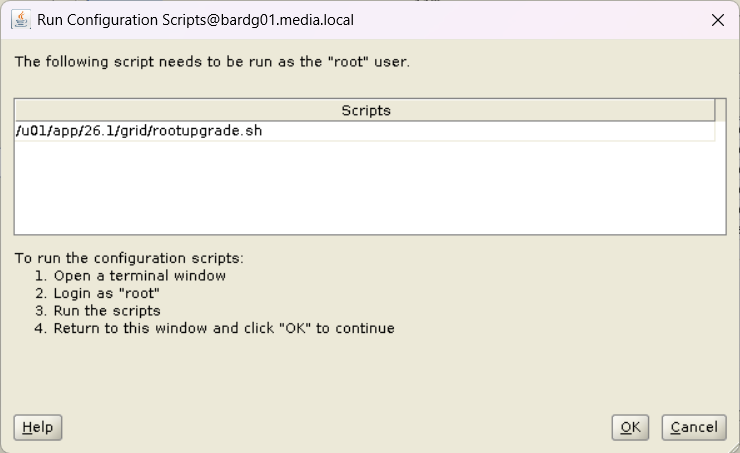
Nothing unexpected so far, but when I ran rootupgrade.sh as user root, I encountered an error close to the end.
[root@bardg01 ~]$  /u01/app/26.1/grid/rootupgrade.sh
Performing root user operation.

The following environment variables are set as:
    ORACLE_OWNER= grid
    ORACLE_HOME=  /u01/app/26.1/grid

Enter the full pathname of the local bin directory: [/usr/local/bin]:
The contents of "dbhome" have not changed. No need to overwrite.
The file "oraenv" already exists in /usr/local/bin.  Overwrite it? (y/n)
[n]:
The file "coraenv" already exists in /usr/local/bin.  Overwrite it? (y/n)
[n]:

Entries will be added to the /etc/oratab file as needed by
Database Configuration Assistant when a database is created
Finished running generic part of root script.
Now product-specific root actions will be performed.
Executing command '/u01/app/26.1/grid/perl/bin/perl -I/u01/app/26.1/grid/perl/lib -I/u01/app/26.1/grid/crs/install /u01/app/26.1/gr                              id/crs/install/roothas.pl  -upgrade'
Using configuration parameter file: /u01/app/26.1/grid/crs/install/crsconfig_params
The log of current session can be found at:
  /u01/app/grid/crsdata/bardg01/crsconfig/roothas_2026-04-28_02-52-43PM.log
2026/04/28 14:52:44 CLSRSC-595: Executing upgrade step 1 of 11: 'UpgPrechecks'.
acfsutil info fs: ACFS-03036: no mounted ACFS file systems
2026/04/28 14:52:47 CLSRSC-595: Executing upgrade step 2 of 11: 'GetOldConfig'.
2026/04/28 14:52:50 CLSRSC-595: Executing upgrade step 3 of 11: 'GenSiteGUIDs'.
2026/04/28 14:52:50 CLSRSC-595: Executing upgrade step 4 of 11: 'SetupOSD'.
2026/04/28 14:52:50 CLSRSC-595: Executing upgrade step 5 of 11: 'PreUpgrade'.
2026/04/28 14:53:02 CLSRSC-595: Executing upgrade step 6 of 11: 'UpgradeOLR'.
clscfg: EXISTING configuration version 0 detected.
Creating OCR keys for user 'grid', privgrp 'oinstall'..
Operation successful.
2026/04/28 14:53:06 CLSRSC-595: Executing upgrade step 7 of 11: 'UpgradeOCR'.
LOCAL ONLY MODE
Successfully accumulated necessary OCR keys.
Creating OCR keys for user 'root', privgrp 'root'..
Operation successful.
CRS-4664: Node bardg01 successfully pinned.
2026/04/28 14:53:10 CLSRSC-595: Executing upgrade step 8 of 11: 'CreateOHASD'.
2026/04/28 14:53:11 CLSRSC-595: Executing upgrade step 9 of 11: 'ConfigOHASD'.
2026/04/28 14:53:19 CLSRSC-329: Replacing Clusterware entries in file 'oracle-ohasd.service'
2026/04/28 14:53:27 CLSRSC-595: Executing upgrade step 10 of 11: 'UpgradeSIHA'.

bardg01     2026/04/28 14:54:13     /u01/app/grid/crsdata/bardg01/olr/backup_20260428_145413.olr     2107015493

bardg01     2026/04/20 12:35:05     /u01/app/grid/crsdata/bardg01/olr/backup_20260420_123505.olr     1643218082
2026/04/28 14:54:14 CLSRSC-595: Executing upgrade step 11 of 11: 'InstallACFS'.
2026/04/28 14:54:37 CLSRSC-400: A system reboot is required to continue installing.
Died at /u01/app/26.1/grid/crs/install/oraacfs.pm line 3315.
I was a bit surprised, as ACFS was not in use on this system.
ACFS driver error during upgrade
Looking into the log file, I found the following entries:
(…)
>  ACFS-9154: Loading 'oracleoks.ko' driver.
>  ACFS-9176: Entering 'mpr'
>  ACFS-9177: Return from 'mpr'
>  ACFS-9109: oracleoks.ko driver failed to load.
>  ACFS-9178: Return code = USM_FAIL
>  ACFS-9177: Return from 'ld usm drvs'
>  ACFS-9428: Failed to load ADVM/ACFS drivers. A system reboot is recommended.
>  ACFS-9310: ADVM/ACFS installation failed.
>  ACFS-9178: Return code = USM_REBOOT_RECOMMENDED
>  ACFS-9176: Entering 'count drivers'
(…)
As mentioned before, ACFS was not in use.
After searching the web and MOS, I found the following MOS note:
KB122579: [RAC] Root.sh or Postpatch Failed To Load ACFS Driver “ACFS-9428: Failed to load ADVM/ACFS drivers”
Although this system was not an RAC, it is Grid Infrastructure, and the error described there was very similar.
Two workarounds were mentioned:
Disable ACFS
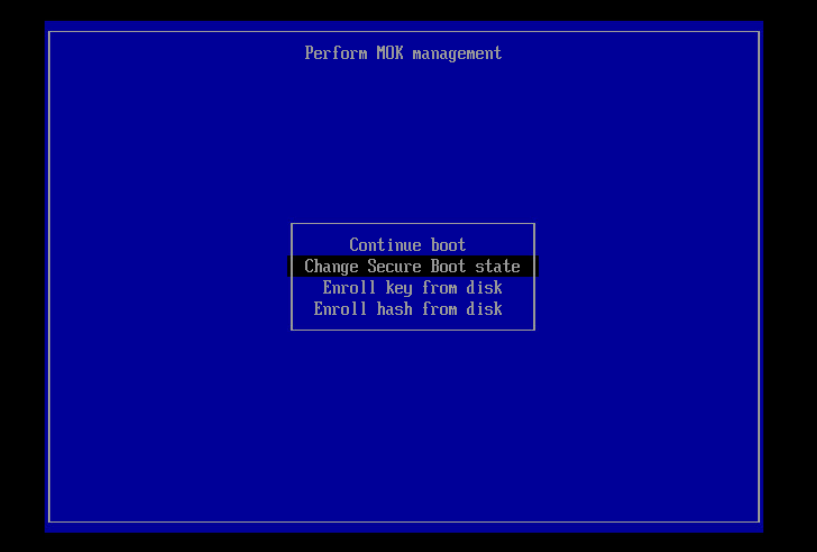
Disable Secure Boot
Disabling ACFS did not help. The error remained the same.
Initially, I planned to certify as Oracle Database 19c OCP. 19c is still the long-term release and is still used in many environments. And it’s been a really long time since I earned my 12c certification.
However, while preparing my learning path, I asked myself a simple question: Wouldn’t it make more sense to get certified for the new 26ai, which is finally available on‑premises?
So instead of certifying on an established platform, I decided to focus on what comes next and went for the Oracle AI Database Administration Certified Professional, based on Oracle Database 23ai / 26c.
After about three to four weeks of preparation, I passed the exam yesterday. This post summarizes my preparation for the exam and highlights the topics that should be paid particular attention to.
Preparation Strategy
My preparation took approximately three to almost four weeks. The effort should not be underestimated; this is not an exam you pass without focused study.
This documentation is a good reference point for understanding which features Oracle considers relevant for database administrators today. It contains topics like AI Vector Search, which was really new for me, Application Deployment (including JSON), and much more.
This course covers additional interesting topics such as True Cache, several chapters on performance tuning and Oracle advisors, migration topics, and more.
So, if you have the possibility to watch this course – do it 😉
The course also includes a Student Guide and an Activity Guide, and you can request your own lab so that you can practice hands‑on.
There is the possibility to perform all exercises in your own environment. I did not use this specific lab, but all LiveLabs I have used so far were of good quality.
So, try, try, try. Especially topics like multitenant management, RMAN recovery, or PDB relocation only really “stick” when you perform them yourself.
Exam focus areas – what really matters
I obviously cannot share actual exam questions, but I can share my observations regarding topic focus.
Performance Tuning
AWR
ADDM
Advisors
Performance analysis in CDB vs. PDB context
Understanding where and how to analyze performance is essential.
Multitenant – The core topic
No surprise here: Multitenant is no longer optional.
Important areas include:
PDB relocate
Transportable PDBs
Clear understanding of CDB and PDB separation
RMAN Backups in Multitenant Architectures
Expect questions about:
CDB‑level backups
PDB‑level restore and recovery
Conceptual understanding, not just RMAN commands
Application Containers
They do appear
For me: one to three questions
You should know the idea and the basic administration concepts.
Security Topics
Some security‑related questions
In my case: no SQL Firewall
Focus was on general security concepts and architecture
Installation and upgrades
AutoUpgrade
DBCA
Grid Infrastructure
Who should consider this certification?
In my opinion, this certification is well suited for DBAs who:
already hold an Oracle OCP (e.g. 12c or 19c)
work regularly with multitenant environments
want to stay aligned with Oracle’s future database direction
Conclusion
This certification requires time and focus. It should be planned and supported accordingly.
For database administrators, it provides:
a consolidated understanding of Oracle Database architecture
updated knowledge
formal validation of expertise
For employers, certified administrators represent:
reduced operational risk
verified skill levels
stronger positioning for future Oracle Database projects
From this perspective, Oracle certification is a clear win‑win situation.
If you’re planning to take the exam: go for it – I’m keeping my fingers crossed for you. 🤞
In preparation for my presentation at the DOAG Database with Cloud Infrastructure (#DOAGDB26) conference, I built a small Data Guard test environment and created the standby database using Oracle Enterprise Manager (OEM).
After creating a physical standby database via Oracle Enterprise Manager and registering it with Oracle Restart, srvctl commands failed with:
PRCD-1024 : Failed to retrieve instance list for database DEMODB_BARDG02
PRCR-1055 : Cluster membership check failed for node bardg02
Installed the required oracle-database-preinstall-* packages
Configured the grid user
After that, I cloned the VM, adjusted the network configuration, and two identical systems were available:
bardg01
bardg02
Grid Infrastructure and Database Installation
bardg01
On bardg01, I installed Oracle Grid Infrastructure for Standalone Server (Oracle Restart) without ASM.
I performed a software‑only installation and configured Oracle Restart afterwards. The installation completed without issues.
After that, I installed the RDBMS software and created a database using DBCA. Everything worked as expected.
bardg02
On bardg02, I repeated the same Grid Infrastructure and RDBMS installation steps. At this stage, I did not create a database.
Creating the Standby Database with OEM
After installing the OEM agents on both hosts, I created a physical standby database via OEM.
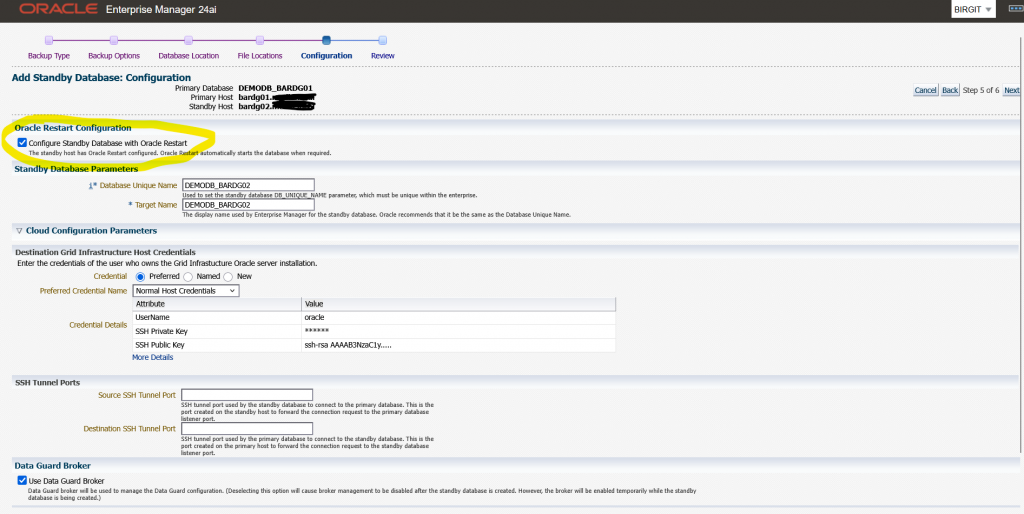
During the wizard I selected the option to “Configure Standby Database with Oracle Restart” See the image below:
The OEM job finished successfully. However, after reviewing the environment, I noticed that:
The standby database was registered with Oracle Restart
The database itself was running, but was shown as offline
grid@bardg02 ~> crsctl stat res -t
--------------------------------------------------------------------------------
Name           Target  State        Server                   State details
--------------------------------------------------------------------------------
Local Resources
--------------------------------------------------------------------------------
ora.LISTENER.lsnr
               ONLINE  ONLINE       bardg02                  STABLE
ora.ons
               OFFLINE OFFLINE      bardg02                  STABLE
--------------------------------------------------------------------------------
Cluster Resources
--------------------------------------------------------------------------------
ora.cssd
      1        OFFLINE OFFLINE                               STABLE
ora.demodb_bardg02.db
      1        OFFLINE OFFLINE                               STABLE
ora.diskmon
      1        OFFLINE OFFLINE                               STABLE
ora.evmd
      1        ONLINE  ONLINE       bardg02                  STABLE
--------------------------------------------------------------------------------
At this point, I simply wanted to check the status of the standby database.
oracle@bardg02 ~> . oraenv
ORACLE_SID = [DEMODB] ? DEMODB
The Oracle base remains unchanged with value /u01/app/oracle
oracle@bardg02 ~> srvctl status database -db demodb_bardg02
PRCD-1024 : Failed to retrieve instance list for database DEMODB_BARDG02
PRCR-1055 : Cluster membership check failed for node bardg02
In my environment, every srvctl command on this host resulted in the same error combination. On my primary host bardg01 every srvctl command was successful.
At this point, I verified a few things:
The Grid Infrastructure installation had completed without errors
I had not manually changed the CSSD configuration
On both hosts, cssd was OFFLINE
I searched online and in MOS and came to the conclusion that this error pair is typically triggered by cluster membership checks performed by srvctl, even in Oracle Restart setups without ASM.
Starting CSSD
My next test was to start CSSD, and I configured it to start automatically after reboot.
grid@bardg02 ~> crsctl modify resource ora.cssd -attr "AUTO_START=always" -unsupported
grid@bardg02 ~> crsctl start res ora.cssd -unsupported
grid@bardg02 ~> crsctl stop has
CRS-2791: Starting shutdown of Oracle High Availability Services-managed resources on 'bardg02'
CRS-2673: Attempting to stop 'ora.LISTENER.lsnr' on 'bardg02'
CRS-2677: Stop of 'ora.LISTENER.lsnr' on 'bardg02' succeeded
CRS-2673: Attempting to stop 'ora.evmd' on 'bardg02'
CRS-2677: Stop of 'ora.evmd' on 'bardg02' succeeded
CRS-2793: Shutdown of Oracle High Availability Services-managed resources on 'bardg02' has completed
CRS-4133: Oracle High Availability Services has been stopped.

grid@bardg02 ~> crsctl start has
CRS-4123: Oracle High Availability Services has been started.

grid@bardg02 ~> crsctl stat res -t
--------------------------------------------------------------------------------
Name           Target  State        Server                   State details
--------------------------------------------------------------------------------
Local Resources
--------------------------------------------------------------------------------
ora.LISTENER.lsnr
               ONLINE  ONLINE       bardg02                  STABLE
ora.ons
               OFFLINE OFFLINE      bardg02                  STABLE
--------------------------------------------------------------------------------
Cluster Resources
--------------------------------------------------------------------------------
ora.cssd
      1        ONLINE  ONLINE       bardg02                  STABLE
ora.demodb_bardg02.db
      1        ONLINE  INTERMEDIATE bardg02                  Mounted (Closed),HOM
                                                             E=/u01/app/oracle/pr
                                                             oduct/19.28/db_home1
                                                             ,STABLE
ora.diskmon
      1        OFFLINE OFFLINE                               STABLE
ora.evmd
      1        ONLINE  ONLINE       bardg02                  STABLE
--------------------------------------------------------------------------------
After that I retried the srvctl command:
oracle@bardg02 ~> srvctl status database -db DEMODB_BARDG02
Database is running.
Attribute HOSTING_MEMBERS
To better understand the behaviour, I ran some additional tests with the database resource attribute HOSTING_MEMBERS.
grid@bardg02 ~> crsctl modify resource "ora.demodb_bardg02.db" -attr "HOSTING_MEMBERS=" -unsupported
grid@bardg02 ~> crsctl stat res ora.demodb_bardg02.db -f |grep HOSTING_
HOSTING_MEMBERS=
All srvctl commands ran successfully
oracle@bardg02 ~> srvctl status database -db DEMODB_BARDG02
Database is running.
oracle@bardg02 ~> srvctl stop database -db DEMODB_BARDG02
oracle@bardg02 ~> srvctl status database -db DEMODB_BARDG02
Database is not running.
oracle@bardg02 ~> srvctl start database -db DEMODB_BARDG02
oracle@bardg02 ~> srvctl status database -db DEMODB_BARDG02
Database is running.
With this configuration the database could be managed even when cssd was OFFLINE.
Next test:
HOSTING_MEMBERS=bardg02
cssd = OFFLINE
All srvctl commands failed again with:
PRCD-1024 : Failed to retrieve instance list for database demodb_bardg02
PRCR-1055 : Cluster membership check failed for node bardg02
Next test:
HOSTING_MEMBERS=bardg02
cssd = ONLINE
All srvctl commands ran successfully
Conclusion
Based on my tests, I can conclude the following:
After installing Grid Infrastructure for a standalone server, cssd may initially be OFFLINE
Databases created with DBCA work without issues
Databases added later (for example via OEM Data Guard) can fail with PRCD‑1024 / PRCR‑1055 if cssd is not running
When HOSTING_MEMBERS is used, srvctl clearly relies on cssd, even in Oracle Restart setups without ASM.
Recommendation
From my perspective, there are two possible options:
Start and enable CSSD
Ensure cssd starts automatically after reboot
This is the recommended and clean solution
Remove HOSTING_MEMBERS from the database resource
This works technically
However, it relies on unsupported configuration changes
My recommendation: After installing Oracle Grid Infrastructure for a standalone server, always verify that CSSD is online and configured to start automatically.
There are some blogs, which describe how you can do this manually. And as I saw, you have to do many things manually to create a standby database per PDB. A colleague of mine tested the manual creation of a PDB standby. So I wanted to know, if this is also possible with Oracle Enterprise Manager 24ai.
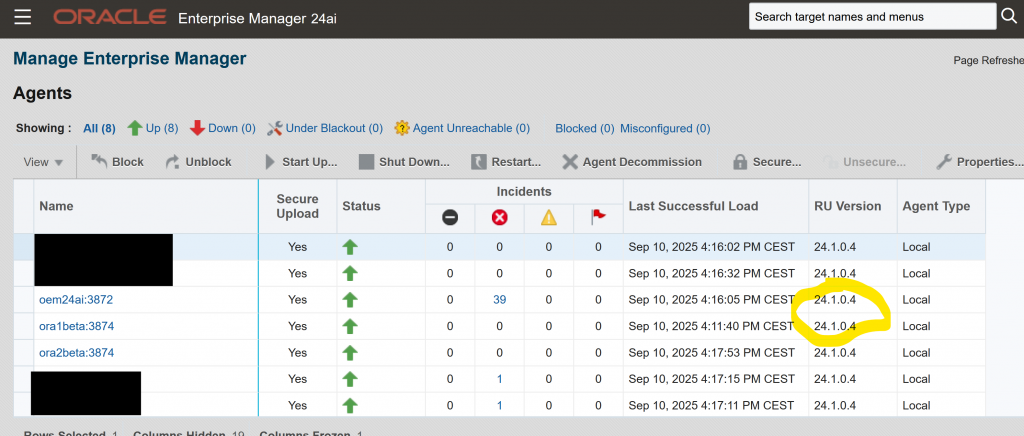
Before I started, I patched my OEM24ai to the latest RU. In my case RU04. Afterwards I also patched the corresponding agents on my hosts, on which Oracle 23ai is installed.
I wanted to know, if it is possible to create a PDB standby.
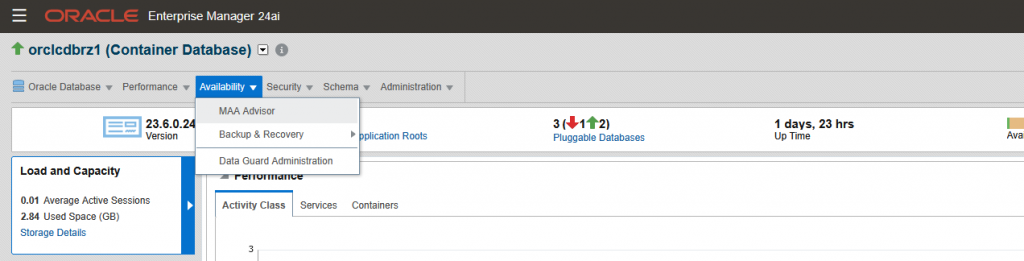
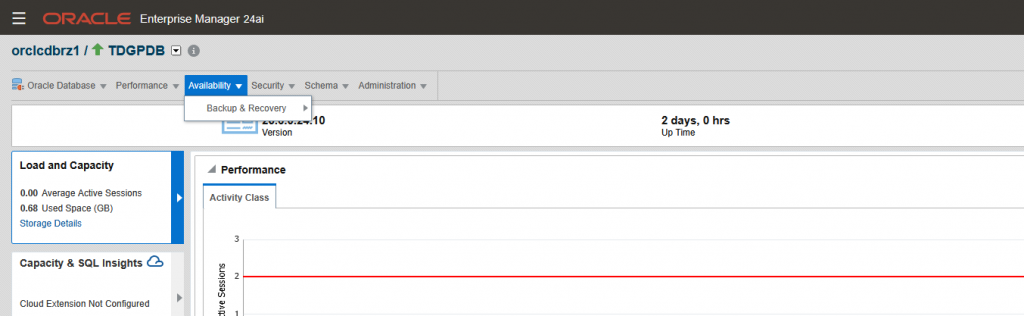
So, let’s start on the homepage of the CDB and have a look at the menue “Availability”
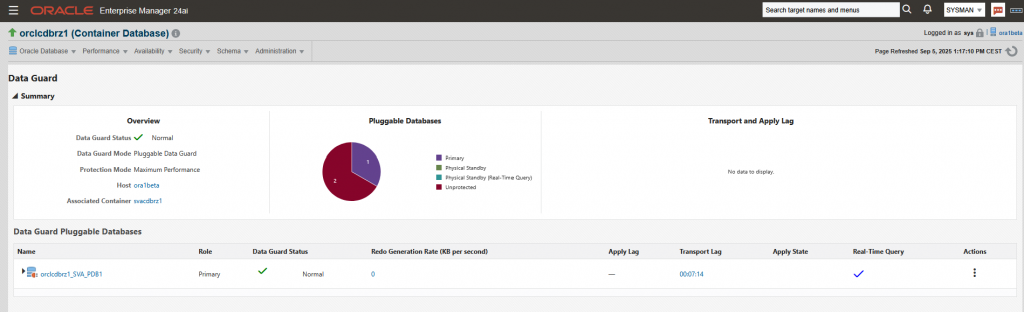
Because there is one Data Guard configuration in my CDB, the menue “Data Guard Adminstation” exists.
What can I do there? Let’s have a look:
The page is like an Oracle Cloud Infrastructure page and so the actions are to find under the three dots.
OK. I can do a switchover, failover, apply on and off and I can remove the standby. Nothing else. These things were also possible with OEM13c and RDBMS 19c. And what I found lacking in the actions was the ability to check the Data Guard configuration, as I can in OEM13c.
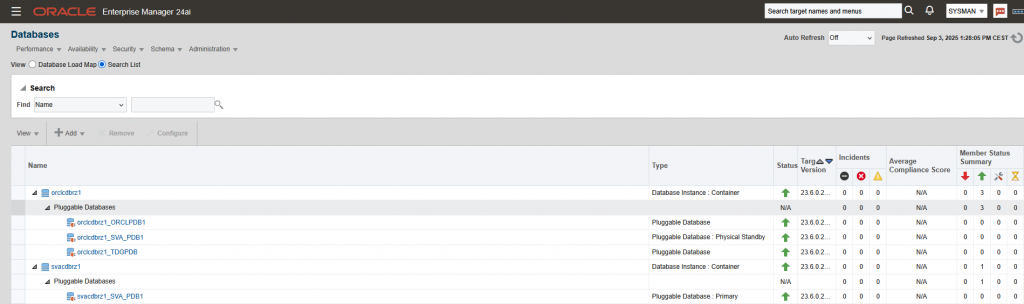
But I originally wanted to create a new PDB standby database, so let’s go back to the homepage and switch to a PDB, which is not in a Data Guard configuration
Unfortunately there isn’t a menue “Add Standby Databases”, like in OEM13c
I searched the web, but I did not find anything about creation of a per-PDB standby and OEM24ai.
So, my conclusion is: It is not possible until now. Unfortunately 🙁 Hope, this will be a new feature in one of the future Release Updates!
Last year, I tried to become an Oracle ACE, but unfortunately, it didn’t work. No blogs, too few presentations…
At the DOAG Conference and Exhibition 2024, I introduced myself to Oliver Pyka (see https://pyka.de/), an Oracle ACE Pro. He presented the Oracle ACE program at the DOAG Conference and Exhibition 2024 in a cool slot.
Since then, he has supported and mentored me and given me tips on how to meet the requirements to become an Oracle ACE.
In June he nominated me again for Oracle ACE and this Monday it happened – I got the email, that the nomination was successful.
So, since Monday I am a proud Oracle ACE – and I am very happy about this.
If you also want to be an Oracle ACE – don’t give up! Start blogging, start presenting, start community meetings – hope that helps!
This blog entry is not really anything special. But I had one error and noticed something that is perhaps not entirely uninteresting.
For my presentation at the DOAG database in Rust, I installed an agent on a MySQL host. OK, MySQL is also Oracle, but no Oracle database 😉
I did not do this via the GUI / webconsole, but manually via the agentDeploy.sh script. I copied the agent software to my MySQL host and created the following responsefile:
The host and the operating system were installed for MySQL not for Oracle. Therefor I got some of prerequisite checks warnings and errors.
My first try looked like:
[sqlbar@mysql01 agent_sw]$ ./agentDeploy.sh AGENT_BASE_DIR=/mysql/app/oracle/agent RESPONSE_FILE=/mysql/software/agent_sw/agent_bar.rsp

The space available is ....  9642 MB
Executing command : /mysql/app/oracle/agent/agent_24.1.0.0.0/jdk/jre/bin/java -classpath /mysql/app/oracle/agent/agent_24.1.0.0.0/jlib/agentInstaller.jar:/mysql/app/oracle/agent/agent_24.1.0.0.0/oui/modules/OraInstaller.jar     oracle.sysman.agent.installer.AgentInstaller /mysql/app/oracle/agent/agent_24.1.0.0.0 /mysql/software/agent_sw /mysql/app/oracle/agent $args -prereq
AGENT_ins home is:AGENT_BASE_DIR=/mysql/app/oracle/agentoraclehome is:/mysql/app/oracle/agent/agent_24.1.0.0.0
log loction is setlog
The oraclehome /mysql/app/oracle/agent/agent_24.1.0.0.0

Agent deployment log location: /mysql/app/oracle/agent/agent_24.1.0.0.0/cfgtoollogs/agentDeploy/agentDeploy_2025-01-17_10-35-05-AM.log
Agent deployment completed successfully.
Validating the OMS Host and Port completed.
/mysql/software/agent_sw/agentcore.bin -ignoreSysPrereqs -prereqChecker -entryPoint oracle.sysman.top.agent_Complete -silent -ignoreSysPrereqs -detailedExitCodes  -responseFile /mysql/app/oracle/agent/agentInstall.rsp  -J-DORACLE_HOSTNAME=mysql01 -J-DAGENT_PORT=3872 -J-Djava.io.tmpdir=/mysql/app/oracle/agent/agent_24.1.0.0.0/cfgtoollogs/prereqlogs -J-DAGENT_BASE_DIR=/mysql/app/oracle/agent -J-DOMS_HOST=oem24ai -J-DEM_UPLOAD_PORT=4903
Launcher log file is /mysql/app/oracle/agent/agent_24.1.0.0.0/cfgtoollogs/prereqlogs/OraInstall2025-01-17_10-35-22AM/launcher2025-01-17_10-35-22AM.log.
Checking swap space: must be greater than 512 MB.   Actual 2047 MB    Passed
Checking if this platform requires a 64-bit JVM.   Actual 64    Passed (-d64 flag is not required)
Checking temp space: must be greater than 300 MB.   Actual 8370 MB    Passed
Preparing to launch the Oracle Universal Installer from /mysql/app/oracle/agent/agent_24.1.0.0.0/cfgtoollogs/prereqlogs/OraInstall2025-01-17_10-35-22AM
Oracle Prerequisite Checker Version 13.9.4.0.0 Production
Copyright (C) 1999, 2024, Oracle and/or its affiliates.

Starting execution of prerequisite checks
Total No of checks: 11

Performing check for CertifiedVersions_agent
Is the software certified on the current operating system?
Expected result: One of oracle-8, oracle-7, SuSE-11, SuSE-12, SuSE-15, redhat-7, redhat-8, oracle-9, ubuntu-22, debian-11
Actual Result: redhat-8.10
Check complete. The overall result of this check is: Passed


Check complete: Passed
========================================================
Performing check for Packages_agent
Are the required packages installed on the current operating system?
Checking for make-3.82-21; Not found.   Failed
Checking for binutils-2.23; found binutils-2.30-123.0.2.el8-x86_64.     Passed
Checking for libaio-0.3.109-12; found libaio-0.3.112-1.el8-x86_64.      Passed
Checking for glibc-common-2.17-55; found glibc-common-2.28-251.0.2.el8_10.5-x86_64.     Passed
Checking for libstdc++-4.8.2-16; found libstdc++-8.5.0-22.0.1.el8_10-x86_64.    Passed
Checking for sysstat-10.1.5-4; Not found.       Failed
Checking for libnsl-2.28-18; Not found. Failed
Check complete. The overall result of this check is: Failed


Check complete: Failed
Problem: Some required packages are missing.
Recommendation: You may actually have installed packages which have obsoleted these, in which case you can  successfully continue with the install. If you have not, it is recommended that you do not continue.

========================================================
Performing check for CompatibilityCheck
Is the software compatible with the current operating system?
sourceLoc is :/mysql/app/oracle/agent/agent_24.1.0.0.0/cfgtoollogs/prereqlogs/OraInstall2025-01-17_10-35-22AM/stage/shiphomeproperties.xml
ARU ID is:226
Platform is :x86_64
Check complete. The overall result of this check is: Passed


Check complete: Passed
========================================================
Performing check for AvailableInventorySpace
Checking for sufficient disk space in the Inventory Location
Expected result: 100.0MB
Actual Result: 4711MB
Check complete. The overall result of this check is: Passed


Check complete: Passed
========================================================
Performing check for InventoryWritableCheck
Checking for write permissions on the inventory.
Check complete. The overall result of this check is: Passed


Check complete: Passed
========================================================
Performing check for TZRegionCheck
Checking TimeZone settings...
Check complete. The overall result of this check is: Passed


Check complete: Passed
========================================================
Performing check for AgentBaseDirCheck
Is the ownership of the agent base directory valid?
Check complete. The overall result of this check is: Passed


Check complete: Passed
========================================================
Performing check for PortCheck
Checking for port availability and hostname validity...
Host name to check mysql01
Host name is not valid
Getting Inet Addresses for host mysql01
Trying for host : mysql01/**.**.**.** and port : 3874
Trying for host : /**.**.**.** and port : 3874
** Agent Port Check completed successfully.**
Agent port to use 3874
===Expected Result final Port 3874 must be available on all IP addresses associated with host mysql01.
Expected result: Port 3872 must be available on all IP addresses associated with host mysql01.
Actual Result: 3874
Check complete. The overall result of this check is: Passed


Check complete: Passed
========================================================
Performing check for OracleHomeCheck
Checking whether the old oracle home entry is present in the central inventory ...
Check complete. The overall result of this check is: Passed


Check complete: Passed
========================================================
Performing check for CheckHostName
Is the host name valid?
value of oracle_hostname:mysql01
Expected result: Fully qualified domain name, for example foo.mydomain.com
Actual Result: mysql01. Ensure that you provide a fully qualified domain name.
Check complete. The overall result of this check is: Failed


Check complete: Failed
Problem: The host name specified for the installation or retrieved from the system is incorrect.
Recommendation: Ensure that your host name meets the following conditions:
   (1) Does NOT contain localhost.localdomain.
   (2) Does NOT contain any IP address.
   (3) Ensure that the /etc/hosts file has the host details in the following format.
         <IP address>   <host.domain>   <short hostname>

         If you do not have the permission to edit the /etc/hosts file,
         then while invoking the installer pass the host name using the argument ORACLE_HOSTNAME.


========================================================
Performing check for CheckOMSHostandPort
Checking for the OMS Host and EM Upload Port
Expected result: OMS Host: oem24ai, EM Upload Port: **** provided is valid
Actual Result: OMS Host: oem24ai, EM Upload Port: **** provided is valid
Check complete. The overall result of this check is: Passed


Check complete: Passed
========================================================
PrereqChecks complete


The log(s) can be found here: /mysql/app/oracle/agent/agent_24.1.0.0.0/cfgtoollogs/prereqlogs/OraInstall2025-01-17_10-35-22AM.
ERROR: Installer execution failed (2).
Agent Prereqs failed.
Check the logs at /mysql/app/oracle/agent/agent_24.1.0.0.0/cfgtoollogs/prereqlogs
OK, let’s install the needed packages. (The installation of the needed package you should know, so I do not show this here. If not please ask your system administrator… )
Second try:
[sqlbar@mysql01 agent_sw]$ ./agentDeploy.sh AGENT_BASE_DIR=/mysql/app/oracle/agent RESPONSE_FILE=/mysql/software/agent_sw/agent_bar.rsp -force

The space available is ....  9642 MB
Executing command : /mysql/app/oracle/agent/agent_24.1.0.0.0/jdk/jre/bin/java -classpath /mysql/app/oracle/agent/agent_24.1.0.0.0/jlib/agentInstaller.jar:/mysql/app/oracle/agent/agent_24.1.0.0.0/oui/modules/OraInstaller.jar     oracle.sysman.agent.installer.AgentInstaller /mysql/app/oracle/agent/agent_24.1.0.0.0 /mysql/software/agent_sw /mysql/app/oracle/agent $args -prereq
AGENT_ins home is:AGENT_BASE_DIR=/mysql/app/oracle/agentoraclehome is:/mysql/app/oracle/agent/agent_24.1.0.0.0
log loction is setlog
The oraclehome /mysql/app/oracle/agent/agent_24.1.0.0.0

Agent deployment log location: /mysql/app/oracle/agent/agent_24.1.0.0.0/cfgtoollogs/agentDeploy/agentDeploy_2025-01-17_10-47-31-AM.log
Agent deployment completed successfully.
Validating the OMS Host and Port completed.
-force
/mysql/software/agent_sw/agentcore.bin -ignoreSysPrereqs -prereqChecker -entryPoint oracle.sysman.top.agent_Complete -silent -ignoreSysPrereqs -detailedExitCodes  -responseFile /mysql/app/oracle/agent/agentInstall.rsp  -J-DORACLE_HOSTNAME=mysql01 -J-DAGENT_PORT=3872 -J-Djava.io.tmpdir=/mysql/app/oracle/agent/agent_24.1.0.0.0/cfgtoollogs/prereqlogs -J-DAGENT_BASE_DIR=/mysql/app/oracle/agent -J-DOMS_HOST=oem24ai -J-DEM_UPLOAD_PORT=4903
Launcher log file is /mysql/app/oracle/agent/agent_24.1.0.0.0/cfgtoollogs/prereqlogs/OraInstall2025-01-17_10-47-45AM/launcher2025-01-17_10-47-45AM.log.
Checking swap space: must be greater than 512 MB.   Actual 2047 MB    Passed
Checking if this platform requires a 64-bit JVM.   Actual 64    Passed (-d64 flag is not required)
Checking temp space: must be greater than 300 MB.   Actual 8370 MB    Passed
Preparing to launch the Oracle Universal Installer from /mysql/app/oracle/agent/agent_24.1.0.0.0/cfgtoollogs/prereqlogs/OraInstall2025-01-17_10-47-45AM
Oracle Prerequisite Checker Version 13.9.4.0.0 Production
Copyright (C) 1999, 2024, Oracle and/or its affiliates.

Starting execution of prerequisite checks
Total No of checks: 11

Performing check for CertifiedVersions_agent
Is the software certified on the current operating system?
Expected result: One of oracle-8, oracle-7, SuSE-11, SuSE-12, SuSE-15, redhat-7, redhat-8, oracle-9, ubuntu-22, debian-11
Actual Result: redhat-8.10
Check complete. The overall result of this check is: Passed


Check complete: Passed
========================================================
Performing check for Packages_agent
Are the required packages installed on the current operating system?
Checking for make-3.82-21; found make-1:4.2.1-11.el8-x86_64.    Passed
Checking for binutils-2.23; found binutils-2.30-123.0.2.el8-x86_64.     Passed
Checking for libaio-0.3.109-12; found libaio-0.3.112-1.el8-x86_64.      Passed
Checking for glibc-common-2.17-55; found glibc-common-2.28-251.0.2.el8_10.5-x86_64.     Passed
Checking for libstdc++-4.8.2-16; found libstdc++-8.5.0-22.0.1.el8_10-x86_64.    Passed
Checking for sysstat-10.1.5-4; found sysstat-11.7.3-13.0.2.el8_10-x86_64.       Passed
Checking for libnsl-2.28-18; found libnsl-2.28-251.0.2.el8_10.5-x86_64. Passed
Check complete. The overall result of this check is: Passed


Check complete: Passed
========================================================
Performing check for CompatibilityCheck
Is the software compatible with the current operating system?
sourceLoc is :/mysql/app/oracle/agent/agent_24.1.0.0.0/cfgtoollogs/prereqlogs/OraInstall2025-01-17_10-47-45AM/stage/shiphomeproperties.xml
ARU ID is:226
Platform is :x86_64
Check complete. The overall result of this check is: Passed


Check complete: Passed
========================================================
Performing check for AvailableInventorySpace
Checking for sufficient disk space in the Inventory Location
Expected result: 100.0MB
Actual Result: 4705MB
Check complete. The overall result of this check is: Passed


Check complete: Passed
========================================================
Performing check for InventoryWritableCheck
Checking for write permissions on the inventory.
Check complete. The overall result of this check is: Passed


Check complete: Passed
========================================================
Performing check for TZRegionCheck
Checking TimeZone settings...
Check complete. The overall result of this check is: Passed


Check complete: Passed
========================================================
Performing check for AgentBaseDirCheck
Is the ownership of the agent base directory valid?
Check complete. The overall result of this check is: Passed


Check complete: Passed
========================================================
Performing check for PortCheck
Checking for port availability and hostname validity...
Host name to check mysql01
Host name is not valid
Getting Inet Addresses for host mysql01
Trying for host : mysql01/**.**.**.** and port : 3874
Trying for host : /**.**.**.** and port : 3874
** Agent Port Check completed successfully.**
Agent port to use 3874
===Expected Result final Port 3874 must be available on all IP addresses associated with host mysql01.
Expected result: Port 3874 must be available on all IP addresses associated with host mysql01.
Actual Result: 3874
Check complete. The overall result of this check is: Passed


Check complete: Passed
========================================================
Performing check for OracleHomeCheck
Checking whether the old oracle home entry is present in the central inventory ...
Check complete. The overall result of this check is: Passed


Check complete: Passed
========================================================
Performing check for CheckHostName
Is the host name valid?
value of oracle_hostname:mysql01
Expected result: Fully qualified domain name, for example foo.mydomain.com
Actual Result: mysql01. Ensure that you provide a fully qualified domain name.
Check complete. The overall result of this check is: Failed


Check complete: Failed
Problem: The host name specified for the installation or retrieved from the system is incorrect.
Recommendation: Ensure that your host name meets the following conditions:
   (1) Does NOT contain localhost.localdomain.
   (2) Does NOT contain any IP address.
   (3) Ensure that the /etc/hosts file has the host details in the following format.
         <IP address>   <host.domain>   <short hostname>

         If you do not have the permission to edit the /etc/hosts file,
         then while invoking the installer pass the host name using the argument ORACLE_HOSTNAME.


========================================================
Performing check for CheckOMSHostandPort
Checking for the OMS Host and EM Upload Port
Expected result: OMS Host: oem24ai, EM Upload Port: **** provided is valid
Actual Result: OMS Host: oem24ai, EM Upload Port: **** provided is valid
Check complete. The overall result of this check is: Passed


Check complete: Passed
========================================================
PrereqChecks complete


The log(s) can be found here: /mysql/app/oracle/agent/agent_24.1.0.0.0/cfgtoollogs/prereqlogs/OraInstall2025-01-17_10-47-45AM.
ERROR: Installer execution failed (2).
Agent Prereqs failed.
Check the logs at /mysql/app/oracle/agent/agent_24.1.0.0.0/cfgtoollogs/prereqlogs
Uff – again the error because of the hostname.
My /etc/hosts file looked like this (in reality there is an ip adress 😉 )
And in my lab I do not have a domainname for my hosts, so I do not have any fully qualified domain name. I simple named my host “mysql01”. And in the output of the installation process there is the following statement: “If you do not have the permission to edit the /etc/hosts file, then while invoking the installer pass the host name using the argument ORACLE_HOSTNAME.“ I know this parameter for an installation of the OEM itself, but not for an agent installation, but OK.
So let’s use the help of the agentDeploy.sh script:
[sqlbar@mysql01 agent_sw]$ ./agentDeploy.sh -help
Usage : agentDeploy.sh AGENT_BASE_DIR OMS_HOST EM_UPLOAD_PORT [AGENT_REGISTRATION_PASSWORD RESPONSE_FILE AGENT_INSTANCE_HOME -prereqOnly -softwareOnly -invPtrLoc -help -debug -configOnly -ignorePrereqs -noRollBack -executeRootsh PROPERTIES_FILE]

        AGENT_BASE_DIR              - Agent base directory location
        OMS_HOST            - OMS Hostname
        EM_UPLOAD_PORT              - OMS Upload Port
        AGENT_REGISTRATION_PASSWORD  - Agent registration password to secure the agent
        RESPONSE_FILE               - Response file location
        AGENT_INSTANCE_HOME - Agent instance home is the location of agent state directory
        PLUGIN_RSPFILE       - Response file location used for plugin configuration
        PROPERTIES_FILE     - Agent properties file location that contains the property name and property value which will be set during the deployment
        s_agentHomeName     - Customized agent home name, if not passed default home name will be assigned
        -prereqOnly         - Agent installer will be invoked in prereq mode
        -softwareOnly               - Installs only the files
        -invPtrLoc          - Inventory pointer location file
        -help                       - Usage
        -debug                      - More debug messages will be logged

        -configOnly         - Performs agent configuration only
        -forceConfigure             - Performs agent configuration even if oms is unavailable
        -ignorePrereqs              - Skips the agent prereqs
        -LOG_DIR                    - Customize log location by passing LOG_DIR=/scratch/log
Example1:
         agentDeploy.sh AGENT_BASE_DIR=/scratch/agent OMS_HOST=hostname.domain.com EM_UPLOAD_PORT=1000 AGENT_REGISTRATION_PASSWORD=2Bor02B4
        This command is expected to do the complete agent install and configuration with the provided inputs.

Example2:
         agentDeploy.sh AGENT_BASE_DIR=/scratch/agt RESPONSE_FILE=/scratch/agent.rsp -softwareOnly -invPtrLoc /scratch/agent/oraInst.loc -debug
        This command is expected to copy the agent bits to the agent base directory.

Example3:
         agentDeploy.sh AGENT_BASE_DIR=/scratch/agent OMS_HOST=hostname.domain.com EM_UPLOAD_PORT=1000 -forceConfigure
        This command is expected to do the agent install and also force the agent configuration even though the oms host and port are not available.

Example4:
         agentDeploy.sh AGENT_BASE_DIR=/scratch/agent AGENT_INSTANCE_HOME=/scratch/agent/agent_inst -configOnly
        This command is expected to do the agent configuration only with the provided inputs.

Example5:
         agentDeploy.sh AGENT_BASE_DIR=/scratch/agent s_agentHomeName=myAgent -ignorePrereqs
        This command is expected to skip the prereqs and then continue with the agent deployment also notice in the inventory that instead of the default home name, myAgent home name will be assigned for the agent home.

Example6:
         agentDeploy.sh AGENT_BASE_DIR=/scratch/agent PLUGIN_RSPFILE=/scratch/plugin.txt PROPERTIES_FILE=/scratch/agent.properties
         Let's say the content of the /scratch/agent.properties file is enableAutoTuning=false, then this command with deploy and configure the agent with the enableAutoTuning property set.
Interesting, there is no entry for the parameter ORACLE_HOSTNAME… hm…
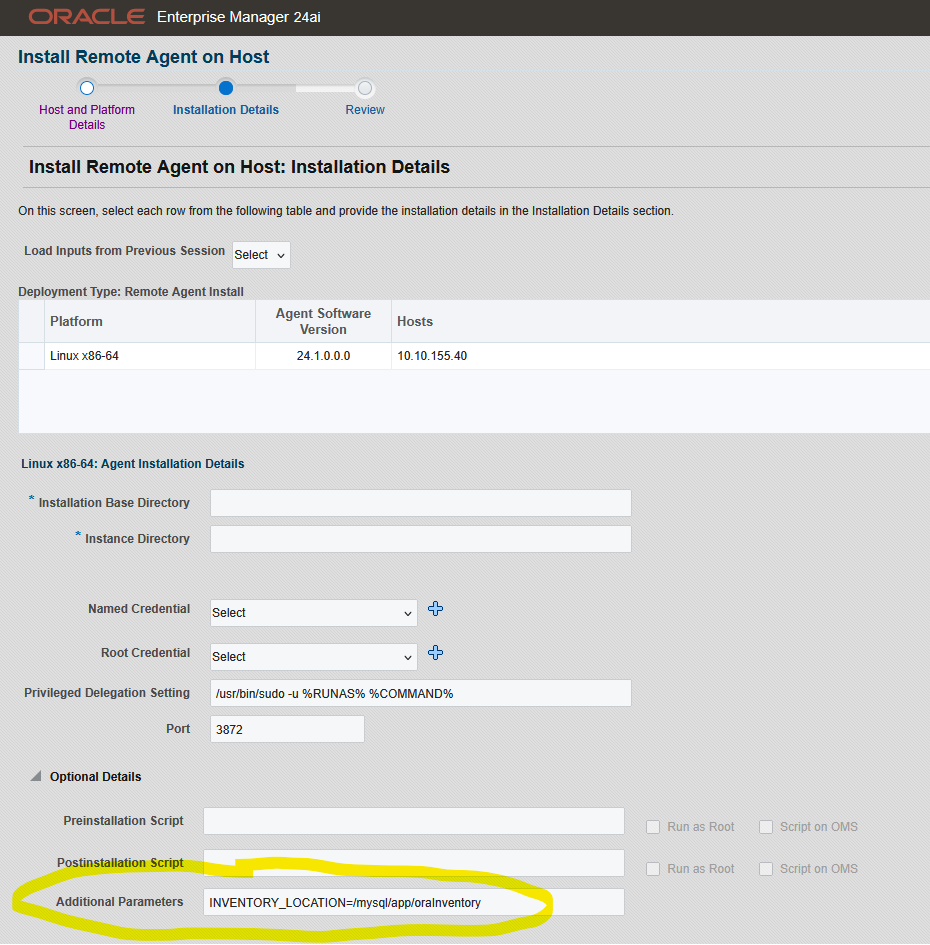
I checked the installation and then I noticed, that the oraInventory was created in the HOME-directory of the installing user. That is not that, what I wanted – uff.
A symbolic link could be a solution, but I don’t think that’s a good idea. Symbolic links usually cause problems sooner or later.
As an Oracle DBA I always let the installer create the oraInventory in /u01/app/ or /opt/app or something similiar. But here I have a non-Oracle database host.
My agent installation, in this example, is /mysql/app/oracle/agent. That is not really a recommended path, but this is only my lab 😉 So, I decided to let the installer create the oraInvenory under /mysql/app/
But first I had to deinstall the agent, but that is not really difficult.
While preparing for my DOAG presentation in May in Rust (#DOAGDB25 / DOAG database with Cloud Infrastructure), I came across some interesting errors when installing the OEM agent 13.5 on Windows.
In my lab I installed the OEM on Linux and I do not use cygwin, therfore I have wanted to install the agent locally, manually and with a responsefile.
The way to install the agent on windows conists with serveral steps:
I use cmd as adminitrator to install the agent. AND normally the installations work fine, but in this case, I got some errors.
Errors during the installation
First error
(...)
INFO: b_agentupgrade=false
MΣr 26, 2025 5:43:58 AM oracle.sysman.agent.installer.AgentInstaller parseResponseFile
INFO: EMCTLCFG_MODE=NONE
MΣr 26, 2025 5:43:58 AM oracle.sysman.agent.installer.AgentInstaller parseResponseFile
INFO: AGENT_MODE=NONE
MΣr 26, 2025 5:43:58 AM oracle.sysman.agent.installer.AgentInstaller parseResponseFile
INFO: s_agentSrvcName=Oracleagent13c1Agent
log loction is setlog
Writing the following contents into C:\app\oracle\product\13.5\agent_13.5.0.0.0\install\oragchomelist
C:\app\oracle\product\13.5\agent_13.5.0.0.0:C:\app\oracle\product\13.5\agent_inst
Both /etc/oragchomelist and /var/opt/oracle/oragchomelist does not exist.
SEVERE: CONFIG_ERROR
SEVERE: CONFIG_ERROR1
The value of chainInstall : false forceConfigure : false skipValidation : false
Validating oms host & port with url: https://:/empbs/genwallet
Validating oms host & port with url: http://:/empbs/genwallet
The status is 1
SEVERE: CONFIG_ERROR2
Validated the oms host and port :- ----
Validated the agent port :- ----
shared agent value is :false
Agent configuration has failed
I searched in MOS, but I only found notes describing that the OEM was not reachable from the target host. So I checked this:
Validated the oms host and port :- oem13-01----4903
Getting Inet Addresses for host mssql01host
** Agent Port Check completed successfully.**
Validated the agent port :- ----3874
shared agent value is :false
servicname is:Oracleagent13c1Agent
service cmd is:cmd /c C:\app\oracle\product\13.5\agent_13.5.0.0.0\bin\nmesrvops create Oracleagent13c1Agent C:\app\oracle\product\13.5\agent_13.5.0.0.0\bin\nmesrvc.exe  auto
SEVERE:Create service for service name:Oracleagent13c1Agent has failed.
Agent configuration has failed
Oh no, what was going on today?
I checked the services and the registry of my host, the mentioned service did not exist on my Windows host.
C:\Users\Administrator>sc delete Oracleagent13c1Agent
[SC] OpenService FAILED 1060:

The specified service does not exist as an installed service.
Again, I searched in MOS and found the note “EM 13c: Cloud Control Agent Installation on Windows Fails with Error: Create service for service name:Oracleagent13c2Agent has failed (Doc ID 2220447.1)“ So I had to install Visual C++ 2010 Redistributables (x64), although a newer version auf Visual C++ was installed on my host.
OK, I did the installation of Visual C++ 2010 Redistributables (x64)
Then I tried to install the agent, again with a reponsefile and got the same error
(...)
INFO: AGENT_MODE=NONE
MΣr 26, 2025 5:43:58 AM oracle.sysman.agent.installer.AgentInstaller parseResponseFile
INFO: s_agentSrvcName=Oracleagent13c1Agent
log loction is setlog
Writing the following contents into C:\app\oracle\product\13.5\agent_13.5.0.0.0\install\oragchomelist
C:\app\oracle\product\13.5\agent_13.5.0.0.0:C:\app\oracle\product\13.5\agent_inst
Both /etc/oragchomelist and /var/opt/oracle/oragchomelist does not exist.
SEVERE: CONFIG_ERROR
SEVERE: CONFIG_ERROR1
The value of chainInstall : false forceConfigure : false skipValidation : false
Validating oms host & port with url: https://:/empbs/genwallet
Validating oms host & port with url: http://:/empbs/genwallet
The status is 1
SEVERE: CONFIG_ERROR2
Validated the oms host and port :- ----
Validated the agent port :- ----
shared agent value is :false
Agent configuration has failed
Then I patched the OEM and also the agent with RU24, but it did not help.
In the output during installation the responefile is copied to another responsefile, in my case to C:/app/oracle/product/13.5/agentInstall.rsp. I took a look in this copied responsefile
There were no parameters for OEM host, upload port, registration password – NOTHING! 😉 I also took a look in the installation logfiles, but there were nothing I could use to search in MOS.
OK, then I again started the installation of the agent with all paramaters